
TL;DR
If you mean Spatie’s vue-tabs-component, its repository is archived and the maintainer says the package is abandoned. For a new Vue interface, start with a maintained component’s installation guide, then check its keyboard behavior, panel associations, styling contract, and release path. DOM Studio’s Vue Tabs reference provides an install command, a working API example, and a live playground; its headless Tabs reference shows the lower-level markup alternative. Spatie repository · DOM Studio Vue Tabs · DOM Studio headless Tabs
Searches for vue-tabs-component can refer to a particular npm package or to the broader problem of putting tabs into a Vue application. Those are different tasks. This reference first identifies the package, then gives a short route to a current Vue tab interface and a checklist for deciding whether any tabs implementation belongs in a production app. It is not a replacement for a component’s complete API documentation.
Table of contents
- Which vue-tabs-component are you looking for?
- Install and inspect a Vue tabs interface
- Decide whether this screen needs tabs
- Tabs accessibility: the reference checks
- Styled wrapper or headless tabs?
- Package and production evaluation checklist
- Frequently asked questions
- Next step
- Sources
- Recommended Reads
Which vue-tabs-component are you looking for?
The exact-name package: Spatie’s vue-tabs-component repository documents the npm package vue-tabs-component. The owner archived the repository on October 24, 2018, and the README explicitly says it has been abandoned. Its examples use Vue.component and Vue.use registration. If you maintain an application that already uses it, the repository remains a useful historical reference for its API. We would not adopt it as an unexamined starting point for a new Vue 3 application; validate compatibility and take ownership of maintenance before considering a fork. This statement describes Spatie’s package, not every package with “tabs” in its name. Spatie repository
A Vue tabs component for a new app: Our DOM Studio Vue Tabs documentation is the direct reference for DomTabs, including its install command, controlled selection, examples, and interactive playground. It is a different package: @getdom/studio, not vue-tabs-component. For teams that want to author the tab buttons and panels directly, the headless Tabs documentation covers the dom-tabs custom element instead. DOM Studio Vue Tabs · Headless Tabs
Install and inspect a Vue tabs interface
For the documented DOM Studio npm path, use a Vue 3 project and follow the installation guide. That guide states a Tailwind CSS v4 requirement and offers two styling routes: a quick trial using @getdom/studio/style.css, or an app-owned stylesheet and theme built with its Tailwind integration. The example below uses the quick-trial route; import the stylesheet once in your application entry point, not in every tabs instance. DOM Studio installation
npm install @getdom/studio
// In your application entry point, alongside your existing Vue setup:
import '@getdom/studio/style.css'
In a Vue single-file component, give each tab a stable key, bind the selected key, and provide a panel slot of the same name. This small example follows the documented DomTabs import, v-model, tabs array, and named-panel contract; your own app supplies its Vue bootstrap, page content, and any product-specific state.
<script setup>
import { ref } from 'vue'
import { DomTabs } from '@getdom/studio'

const active = ref('summary')
const tabs = [
  { key: 'summary', label: 'Summary' },
  { key: 'activity', label: 'Activity' },
]
</script>

<template>
  <DomTabs v-model="active" :tabs="tabs">
    <template #summary>Summary for this workspace.</template>
    <template #activity>Recent workspace activity.</template>
  </DomTabs>
</template>
Do not confuse this import with Spatie’s similarly named package or with the headless dom-tabs custom element. If styles or imports do not resolve, check that the installed package, stylesheet route, and examples all come from the same DOM Studio installation path. The Tabs playground is the faster place to inspect the current prop behavior and alternative presentations; this guide deliberately does not duplicate its prop reference. DOM Studio installation · DOM Studio Vue Tabs
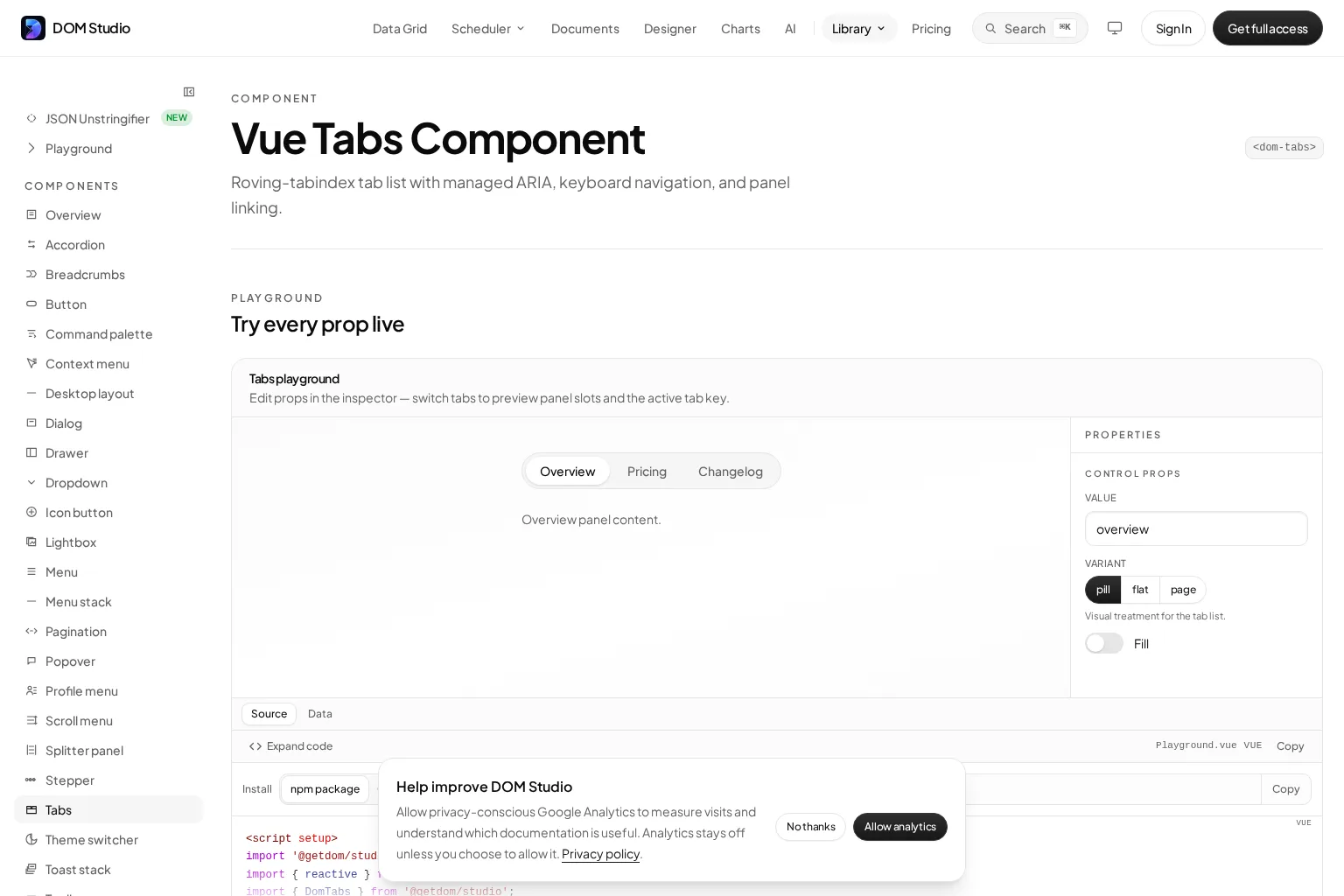
The DOM Studio Tabs playground shows an active panel beside an inspector for trying the component’s presentation and state controls.
Decide whether this screen needs tabs
A tab interface switches among related content panels within one context. The W3C tabs pattern describes one visible panel paired with an associated tab in a tab list. This is a good fit for peer views such as a record’s Summary, Activity, and Settings, provided a person can understand what is hidden behind each label.
A navigation interface takes people to distinct destinations. If the controls change the route, need independently shareable URLs, or represent major application areas, prefer links and a navigation pattern rather than assuming the tablist/tabpanel widget is the right semantic contract. A tab-like visual treatment alone does not make route navigation a tabs widget. On a small screen, a route list may need a compact menu or other navigation design; our mobile web navigation patterns article explores that decision. W3C tabs pattern · Mobile Web Navigation
| Screen behavior | Better starting point | Verify before shipping |
|---|---|---|
| Swap peer panels within the same view | Tabs widget | The active panel and its tab stay associated. |
| Move among pages or product areas | Navigation links | Location and history reflect the selected destination. |
| Show a long sequence or workflow | A step or route pattern | Users can tell which step they are on and what comes next. |
Tabs accessibility: the reference checks
A row of clickable buttons is not sufficient evidence of an accessible tabs implementation. We check the rendered DOM and interaction against the W3C Authoring Practices tabs pattern, then test the actual component in a browser. The pattern describes tablist, tab, and tabpanel roles, selected state, associations between a tab and its panel, and keyboard interaction. Documentation is a starting point, not proof that our specific composition works. W3C tabs pattern
| Check | Expected behavior |
|---|---|
| Structure | A labelled tablist contains tabs; each displayed panel has tabpanel semantics. |
| Association | Each tab’s aria-controls identifies its panel, and the panel’s aria-labelledby identifies its tab. |
| Selection | Exactly one tab in the set reports aria-selected="true", with its corresponding panel visible. |
| Focus | Tab enters the active tab; arrow keys move focus among tabs without forcing people to Tab through every label. |
| Activation | The implementation clearly chooses automatic selection on focus or manual selection with Enter/Space. |
| Panel access | When the panel has no focusable content near its start, it can enter the page’s Tab sequence. |
For a horizontal list, the W3C pattern specifies Left and Right Arrow movement; Home and End are optional. In a vertical list, Up and Down take the corresponding roles. Automatic activation is recommended when panels display without noticeable latency. If selection triggers a slow fetch, manual activation can avoid making every arrow-key movement wait for a network response. Confirm which behavior the component actually implements rather than assuming every tabs library makes the same choice. W3C tabs pattern

The pairing between a tab and a panel should remain stable even when keyboard focus moves to another tab before selection changes.
In our headless Tabs reference, a button’s data-tab="overview" pairs with a region’s data-panel="overview"; the host exposes a selected value. In the Vue wrapper, a tab object’s key corresponds to its named content slot, while v-model holds the active key. These are two distinct APIs built around the same design requirement: the selected identity, control, and displayed content must not drift apart. If tabs are added or removed dynamically, check the active key again and define what should become active when its tab disappears. Headless Tabs · DOM Studio Vue Tabs
Styled wrapper or headless tabs?
Choose by how much of the markup and presentation your team needs to own. The DOM Studio Vue wrapper takes a tabs array, v-model, and panel slots, with documented presentation variants. Its playground is useful when you want to inspect a ready-made API before integrating it. The headless custom element instead lets you write the tab buttons and panel regions using matching data attributes. That gives you direct markup control, but it also means you must inspect your own structure, labelling, styling, and responsive behavior carefully. DOM Studio Vue Tabs · Headless Tabs
Other approaches can be valid. PrimeVue’s Tabs documentation includes controlled and dynamic examples plus an overflowing tab-list example with scroll controls. It is worth studying when your project already uses PrimeVue and tab-list overflow is a real constraint. Do not assume one library’s value, slot names, or overflow behavior works in another; compare the actual documented API and test it in your layout. PrimeVue Tabs
Watch: building tabs with Vue slots
This independent walkthrough of a reusable Vue tabs component complements the API comparison. Use it to think about who owns panel content, then apply the keyboard and ARIA checks above before shipping any implementation of your own.
Package and production evaluation checklist
Before adopting any Vue tabs package, including a fork of vue-tabs-component, we would review the following in a real screen:
- Maintenance and compatibility: Is the repository active? Does the documentation explicitly match your Vue version and build tooling? If a dependency is archived, who will own bug fixes and upgrades? Spatie’s archived repository makes this question concrete. Spatie repository
- Contract and examples: Can you find the install command, entry point, selection model, panel content API, disabled-state behavior, and at least one realistic example without reading internals?
- Keyboard and screen readers: Test arrow keys, Tab movement into the active panel, focus visibility, selected-state announcements, and both pointer and keyboard activation against the W3C tabs pattern.
- Stable identity: Use unique tab keys or IDs. Check that reordering, dynamically closing a tab, or changing its label never selects the wrong panel.
- Content latency: Determine whether switching tabs triggers an async request, whether automatic activation is appropriate, and what loading or error content the panel needs. W3C tabs pattern
- Responsive fit: Try long labels, zoom, narrow widths, and translated text. If labels overflow, assess scrolling with a visible affordance; if the views are actually destinations, reconsider navigation instead of squeezing a large route map into tabs.
- Upgrade risk: Check tests, release notes, and the amount of application logic coupled to package-specific markup before committing to a migration.
Our useful minimum is one representative view with real content and keyboard testing, not a screenshot of a polished inactive tab row. For a broader release framework, the production Vue components guide covers component contracts and quality checks beyond tabs.
Frequently asked questions
Is vue-tabs-component the same package as DOM Studio Tabs?
No. Spatie’s vue-tabs-component is the archived package at its GitHub repository. The DOM Studio Vue component is DomTabs from @getdom/studio, documented on our Vue Tabs page. Use the install instructions for the package you actually choose. Spatie repository · DOM Studio Vue Tabs
Should a tab change the browser URL?
Not inherently. A tabs widget can switch panels without navigating. If each destination should have its own route, history entry, and shareable location, design navigation first. An existing package’s URL-fragment behavior does not automatically make it the right architecture for your screen; Spatie’s README, for example, documents an option to disable fragment changes when they conflict with routing. W3C tabs pattern · Spatie repository
Next step
Start with the DOM Studio Vue Tabs playground if you need a concrete Vue API, or inspect headless Tabs when you need to own the markup. Then test a real tab set with a keyboard, a narrow viewport, and your application’s panel data before choosing an implementation. DOM Studio Vue Tabs · Headless Tabs
Sources
- Spatie, vue-tabs-component repository
- W3C WAI, Tabs Pattern
- DOM Studio, Install the Vue Component Library
- DOM Studio, Vue Tabs Component
- DOM Studio, Headless Tabs Web Component
- PrimeVue, Vue Tabs Component
- DOM Studio, Mobile Web Navigation: Patterns, Accessibility, and Design Decisions