
TL;DR
Build a Vue editable data grid around an application-owned edit pipeline: keep server-confirmed records separate from working rows, parse and validate changes, group multi-cell actions into batches, and acknowledge saves only after the server confirms them. Undo reverses local operations; undoing a saved change requires another authorized write. Verify your DomDataGrid build against the editing documentation before connecting these behaviors.
A cell changing on screen is not the same as a record being saved. That distinction becomes critical when someone pastes a spreadsheet range, undoes several edits, or loses their connection halfway through a request.
We will design an order-management workflow that makes those states explicit. Our focus is the complete path from editing to persistence, not library selection or rendering performance. The application owns the API, permissions, validation rules and conflict resolution.
Table of contents
- Before you start
- 1. Separate confirmed records from working edits
- 2. Define parsing, validation and edit permissions
- 3. Connect editing through one batch adapter
- 4. Choose explicit paste and clear policies
- 5. Make undo reversible without rewriting server history
- 6. Save an immutable snapshot and retain uncertain requests
- 7. Resolve concurrent updates without losing drafts
- 8. Keep grouping, totals and exports honest
- 9. Test the workflow across boundaries
- FAQ
- Put the workflow into your application
- Sources
- Recommended Reads
Before you start
Have a Vue 3 application, representative order records, a backend you can change, and permission to implement version-checked writes. Follow our installation guide for the component and styling setup.
Compatibility gate: checked on November 4, 2026, the live grid documentation describes an expanded editing contract. However, the declared props and events in the published 0.2.6 grid source do not expose that same contract. Obtain a matching build or source revision before relying on those editing features. Do not assume installing 0.2.6 provides everything described below.
The integration and persistence algorithms here are explicitly pseudocode, not a drop-in application or tested component example. The small TypeScript parser is application code. Your endpoint, authentication, database transaction, clipboard importer and error UI remain implementation work.
1. Separate confirmed records from working edits
Start with immutable record identities and a deliberate state model. Our example order contains an id, server-controlled version, quantity and status. Sorting must never change which record an edit addresses.
Keep four distinct layers:
- Confirmed baseline: the last server-confirmed values and versions.
- Working rows: accepted local values rendered by the grid.
- Editor draft: text currently being entered, possibly incomplete or invalid.
- Operation journal: reversible batches describing changes to working rows.
Add a save envelope only when submitting. It captures exactly what that request proposes, rather than pointing at mutable working objects.
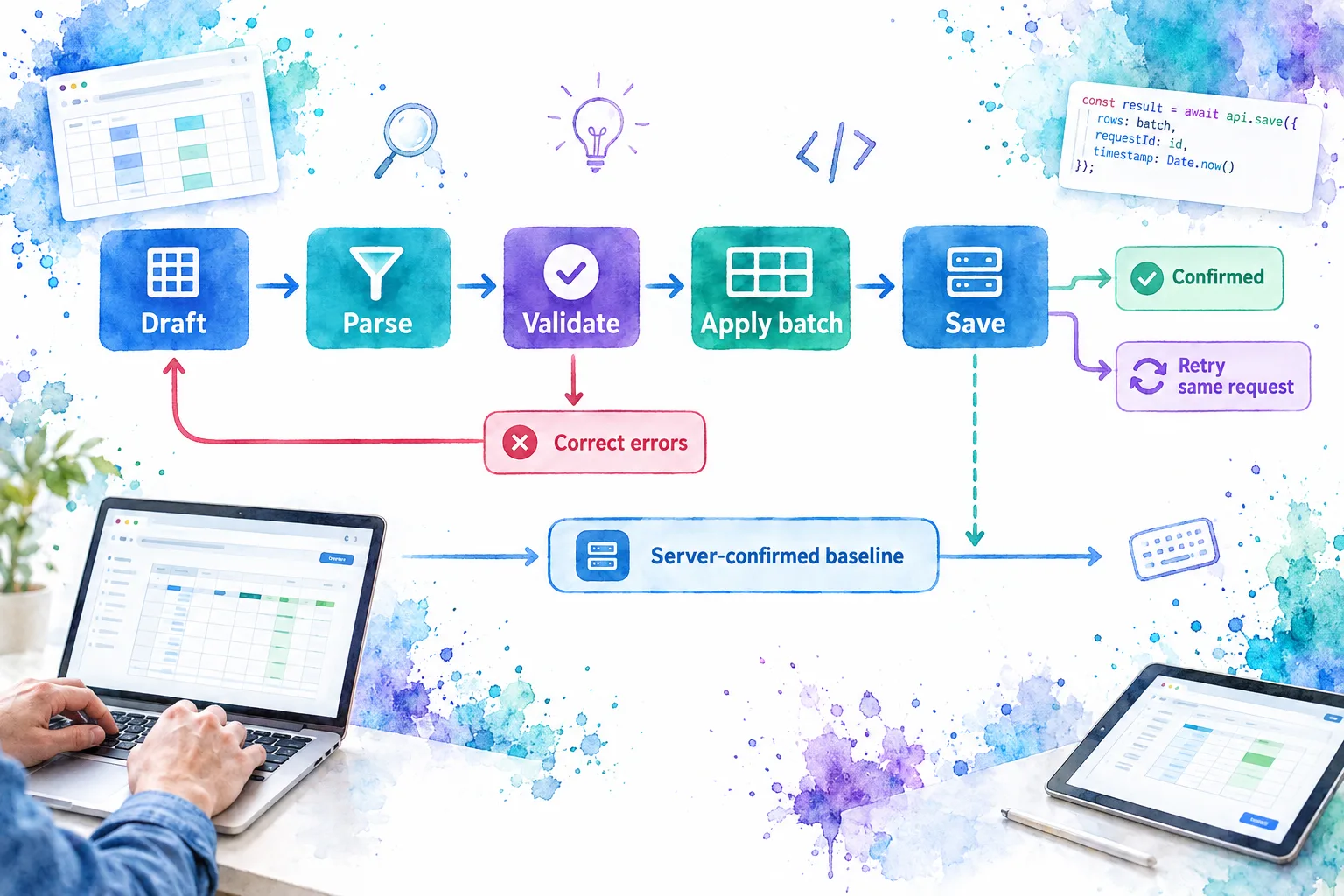
For a quantity changing from 4 to 7, the baseline stays 4, the working value becomes 7, and the journal records both values. The row becomes dirty. Only a successful response advances the baseline.
Compute dirty state from differences against that baseline, not from the number of journal entries. Changing 4 to 7 and then back to 4 leaves history but no unsaved quantity difference.
The documented row-key identifies records and defaults to id. Use stable column keys too. Neither a visible row number nor a position in a sorted array belongs in a mutation request. See the grid identity reference.
Check: sort after editing an order. The draft and dirty indicator must follow its ID. If another order appears modified, inspect identity mapping before debugging rendering.
The application pipeline should preserve the confirmed baseline until a save succeeds:
2. Define parsing, validation and edit permissions
Give each editable field a storage type and an empty-value rule before choosing an editor. For our example, quantity is a non-negative integer no greater than one million; status belongs to an explicit set. IDs and server versions are not editable.
Parsing answers “what value does this text represent?” Validation answers “is that value allowed here?” Formatting only controls presentation.
This standalone application helper rejects partial numeric text instead of silently interpreting 12units as 12:
function parseQuantity(text: string): number | null {
  const normalized = text.trim()
  if (normalized === '') return null
  if (!/^\d+$/.test(normalized)) return Number.NaN

  const value = Number(normalized)
  return Number.isSafeInteger(value) ? value : Number.NaN
}

function validateQuantity(value: unknown): true | string {
  if (typeof value !== 'number' || !Number.isSafeInteger(value)) {
    return 'Enter a whole-number quantity.'
  }
  return value >= 0 && value <= 1_000_000
    ? true
    : 'Quantity must be between 0 and 1,000,000.'
}
Keep NaN inside the parsing boundary; never serialize a failed parse into an API request. Decide separately whether localized separators, negative values or decimal input belong in your domain.
The live documentation describes column parse(text, column) and validate(value, row, column) callbacks, with validation returning true or an error message. It also describes per-cell editability. These are documented integration points, subject to the compatibility gate above, not verified 0.2.6 capabilities.
Show errors with the record and column name, such as “Order A17, Quantity: enter a whole number.” Do not rely on a red border alone. Preserve enough input for correction. For server errors, keep a separate error map keyed by row ID and field.
Check: blank input, 12units and a value beyond the limit must not become accepted quantities. Repeat every business rule on the server; hiding an editor does not authorize a write.
3. Connect editing through one batch adapter
Use one application adapter between grid interaction and working state. It resolves IDs, allowlists writable fields, checks the event shape and records one operation per user action.
The live documentation distinguishes per-cell cell-update notifications from a batch cells-update notification. Do not attach a persistence request to both and accidentally submit the same edit twice. Confirm the batch payload in your matching implementation before destructuring it.
Our intended adapter is pseudocode:
ON documented batch event:
  normalize the verified payload into cell changes
  resolve each target using stable row ID and writable field
  reject malformed targets before mutating application state
  capture before and after values without retaining event row objects
  apply the accepted changes to working rows once
  record a normal edit as one operation
  route undo and redo through history without adding duplicate entries
  recompute dirty cells against the confirmed baseline
The documented keyboard model uses cell-selection for navigation and editing. Test Enter or F2 to start, Escape to cancel, and Tab to commit and move. In that model, leaving a cell commits locally, not to your backend. Grid keyboard and editing documentation.
Avoid adding a competing global keyboard handler. The W3C grid pattern distinguishes grid navigation from operating an input inside a cell.
Check: one edit produces one operation and no network request until Save. If it produces two, inspect duplicate event subscriptions and application history handling.
4. Choose explicit paste and clear policies
A batch notification does not prove that a paste is atomic. Decide what should happen when five cells are valid and the sixth is not.
Per-cell acceptance accepts valid cells and leaves invalid targets unchanged. Present a summary naming rejected cells. The accepted subset becomes one reversible operation. Verify mixed-validity behavior in the matching component build rather than assuming this is its implementation.
Atomic import validates the entire proposed range before applying anything. Use a separate application-owned paste/import preview when this guarantee matters. Do not invent a cancellable grid event or assume rejecting a post-edit notification also resets component history.
These are different application policies, not interchangeable meanings of “batch paste”:
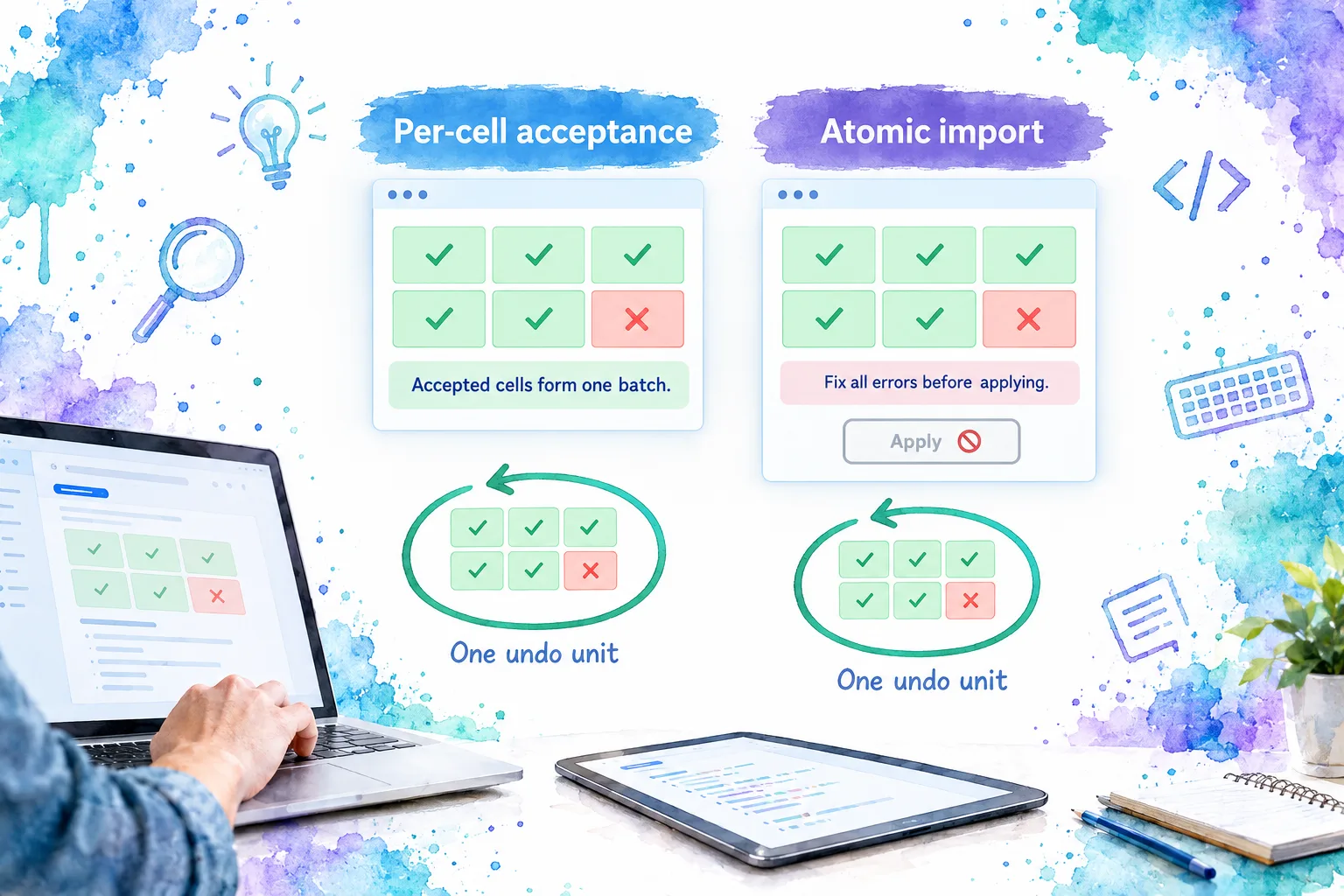
For the atomic path, capture the target row IDs and ordered writable columns when the preview opens. Parse the clipboard matrix, build candidate rows, validate every value, then validate relationships between fields. Apply once only when the complete candidate passes.
For example, a pasted status of approved might require a quantity above zero. Checking each cell against the original row can miss a relationship that only becomes valid or invalid after all pasted values are considered.
Define these boundaries explicitly:
- Reject overflow beyond the permitted target rows or columns.
- State whether hidden and read-only columns are skipped or block import.
- Preserve meaningful empty cells and define how trailing blank lines are treated.
- Put size limits on imports before allocating a large preview.
- Show the target scope before applying to filtered data.
Clearing is a proposed value change, not record deletion. Route it through the same rules. If quantity cannot be blank, clearing it must fail validation rather than quietly becoming zero.
Check: paste a six-cell range containing one invalid status. Assert the chosen policy, exact error locations and one-step undo behavior. If results depend on current sort position, capture stable targets earlier.
5. Make undo reversible without rewriting server history
Represent each operation as a batch of field changes containing row ID, field, before value and after value. Undo applies the inverse; redo reapplies the original. A multi-cell paste should not require dozens of undo actions.
Do not let both component history and application history independently control the same gesture. If the component manages local undo, its reported changes must update the application model without being recorded again as new user edits. An application-owned import needs an application-owned history path unless a documented integration establishes otherwise.
Before saving, reversing quantity 7 back to the baseline 4 can remove that dirty difference. Reversing an earlier operation while later ones remain requires consistent operation order, not a blanket replacement of the entire row.
After saving, the server baseline has advanced. We recommend ending the local undo epoch at that boundary. If the matching grid exposes no documented history-reset mechanism, start a fresh grid instance and restore focus deliberately. Do not call an invented reset method.
Offer Revert saved change separately when users need it. That action proposes the previous value against the current version, revalidates it and sends another authorized request. It does not erase audit history or overwrite newer work automatically.
Check: save 7, then request a revert to 4. The interface should show a new pending change. If another person has since changed the quantity, resolution must happen before the revert can overwrite it.
6. Save an immutable snapshot and retain uncertain requests
For the first implementation, choose explicit Save and serialize requests. Lock editing, undo and import while a save is pending or its outcome is unknown. Provide a visible explanation; disabling only the Save button is insufficient.
Before snapshotting, finish or cancel the active editor through the behavior verified in your build. Otherwise the visible text might not yet exist in working rows.
Construct a net patch from baseline to working state. If quantity changed several times, submit its final proposed value once. Group fields by row and include each row’s expected version. The following JSON is our proposed application contract, not a DOM Studio endpoint:
{
  "requestId": "orders-save-001",
  "rows": [
    {
      "id": "A17",
      "expectedVersion": 8,
      "changes": {
        "quantity": 7,
        "status": "approved"
      }
    }
  ]
}
Use a genuinely unique request identifier in implementation. Store the immutable envelope until its outcome is resolved. A retry must reuse both its identifier and its exact payload.
Design the server to authenticate, authorize each row and field, validate the complete candidate, and compare versions atomically with writing. For this workflow, choose all-or-none persistence: either every submitted row commits or none does.
Store the request identity, payload fingerprint and committed result in the same transactional boundary as the mutation. Duplicate requests must return the previous result, while reusing an ID with a different payload must fail. Define retention and result lookup explicitly; an identifier by itself provides no deduplication.
The client state machine is pseudocode:
SAVE:
  validate and freeze the net patch
  retain its unique request ID and lock editing
  send that exact envelope

CONFIRMED SUCCESS:
  verify response identity and the complete result shape
  replace affected baseline and working rows with canonical server rows
  retain returned versions; end the local undo epoch
  clear resolved errors and unlock editing

DEFINITE REJECTION WITH NO COMMIT:
  preserve working values; attach returned field or conflict errors
  unlock correction; the corrected submission gets a new request ID

TRANSPORT FAILURE OR AMBIGUOUS RESPONSE:
  retain the envelope and keep its outcome marked unknown
  query request status or retry the same envelope through deduplication
Use distinct messages: Unsaved changes, Saving, Saved, Rejected and Save outcome unknown. A timeout, malformed success body or server error is not proof that nothing committed. Do not unlock and submit a different payload under the same unresolved request identity.
If navigation must preserve recovery, retain drafts and unresolved envelopes beyond the component lifetime using storage appropriate to your data sensitivity. An in-memory store does not survive a browser reload.
Check: make the server commit and then drop the response. Retrying must not perform a second mutation or turn the interface falsely clean.
7. Resolve concurrent updates without losing drafts
Keep background refreshes separate from unsaved working rows. A clean row can accept a newer server representation. A dirty row needs a comparison, not an unconditional replacement.
Compare three versions: the baseline when editing began, the local proposal and the latest server row. If the remote quantity changed from 4 to 9 while we proposed 7, show all three values and require a choice. If the remote change affected only another field, a merge may be possible, but revalidate the complete result and submit against the new version.
The application version field in our request is a custom concurrency contract. For a single-resource HTTP design, a strong ETag with If-Match provides a standardized precondition. RFC 9110, section 13.1.1 explains its role in preventing lost updates and the use of 412 Precondition Failed when the condition fails. One header does not supply independent version checks for every row in a multi-record payload.
Make conflict controls explicit: Keep my proposal, Use server value, or Review fields. Keeping a proposal still requires a fresh validated write. Do not silently update the version and resend an overwrite.
For background on that concurrency model, Hussein Nasser’s explanation compares optimistic and pessimistic control. It is conceptual context, not a Vue or DomDataGrid implementation tutorial.
Check: update A17 from another client before saving locally. The stale write must not overwrite it, and our proposed quantity must remain available for review.
8. Keep grouping, totals and exports honest
Decide whether a total represents working values or confirmed values. We recommend showing working totals during editing with an Includes unsaved changes label, while preserving confirmed values for reconciliation.
The live documentation describes grouping, aggregate totals and filtered/sorted exports. Those expanded features also require the matching-build check. See the grouping and totals reference and export reference.
A group heading is not an editable business record. Apply updates through underlying record IDs. Keep calculated fields read-only unless the application defines how editing a derived value changes its inputs.
Offer distinct export meanings when necessary: Export current draft view versus Export confirmed records. Never label a draft export as saved data. For remote queries, exporting loaded rows and exporting every server match are separate operations; name their scopes clearly.
Check: edit a grouped field, change a quantity, filter and export. The displayed group, total and exported values must correspond to the chosen data layer. If a moved row disappears under the filter, keep its unsaved state discoverable outside that view.
9. Test the workflow across boundaries
Use a small fixture with stable IDs and known versions. Test the application transaction logic independently, then exercise the actual grid integration in a browser.
| Scenario | Required result |
|---|---|
| Enter or F2, type, then Escape | Draft cancels without creating a working change. |
| Tab or leave a cell | Local commit follows the verified keyboard contract. |
| Invalid quantity or empty required status | No invalid value enters the accepted working model. |
| Mixed-validity paste | The declared partial or atomic policy holds consistently. |
| Paste, clear, undo and redo | Each action has the intended batch boundary. |
| Sort or filter after editing | Dirty state follows record IDs. |
| Save twice while pending | Only the retained request envelope is active. |
| Definite server rejection | Drafts remain and errors identify their cells. |
| Commit followed by response loss | Deduplicated retry recovers the original result. |
| Remote update before save | Conflict handling preserves both versions. |
Also test an expired session, missing permissions and a rejected multi-row save. Verify the server changes zero rows when the chosen atomic contract fails.
Run keyboard and screen-reader checks on your composed screen, especially custom editors, error summaries and focus after a save boundary. The W3C grid pattern makes focus management part of the interaction contract; a spreadsheet appearance is not evidence of accessibility.
Finally, test refresh, route changes and reload during an uncertain request. Recovery should identify the unresolved submission rather than replace it with a new operation. If you allow editing while saves are in flight later, add per-operation acknowledgements and rebasing tests before removing the initial lock.
FAQ
Does a batch event mean the database update is atomic?
No. It groups an interaction. Our application must separately define paste acceptance, request boundaries and an atomic server transaction.
Should we autosave every changed cell?
Not for this first workflow. Explicit Save keeps correction, undo and request recovery easier to reason about. Autosave needs the same version checks, deduplication and response reconciliation, with more concurrency to manage.
Put the workflow into your application
The completed design preserves drafts, explains rejected changes and distinguishes local success from server confirmation. Start by verifying a matching build against the working grid examples, then connect one version-checked save transaction. Prove response-loss recovery before expanding the workflow.
Sources
- DOM Studio: Data Grid documentation and examples
- DOM Studio: Installation
- DOM Studio 0.2.6: Published grid source
- W3C WAI-ARIA Authoring Practices: Grid pattern
- RFC 9110: If-Match and conditional writes
- Hussein Nasser: Pessimistic versus optimistic concurrency control
Recommended Reads
- Editable-Textarea in Vue: Build an Inline Editor That Preserves Drafts, for a smaller draft, cancel and conflict interaction.
- 6 Vue Data Grid Options for Production Apps: Features, Control, and Fit, if you still need to select a grid.
- Virtualized Table in Vue: Build Fast Rows Without Losing Grid Interactions, for the separate rendering and focus challenges of windowed rows.