
You’ve just shipped a settings page. The switch animates beautifully, the designer is happy, and then the accessibility review lands. Tab skips the control entirely, a screen reader announces it as a link, and the label flips from Enable to Disable so nobody’s sure what state it’s in. That’s the moment teams realise toggle buttons UI isn’t a styling problem at all. It’s a state communication problem, and the fix starts long before you choose colours.
Table of Contents
- Why Most Toggle Buttons Fail Before Users Touch Them
- Building the Right Semantic Foundation
- Keyboard Handling and State Announcement
- Styling With Tailwind for Every State
- Choosing Between Switches, Checkboxes, and Buttons
- Testing Toggles as a Release Gate
- A Contract You Can Pin in Your Repo
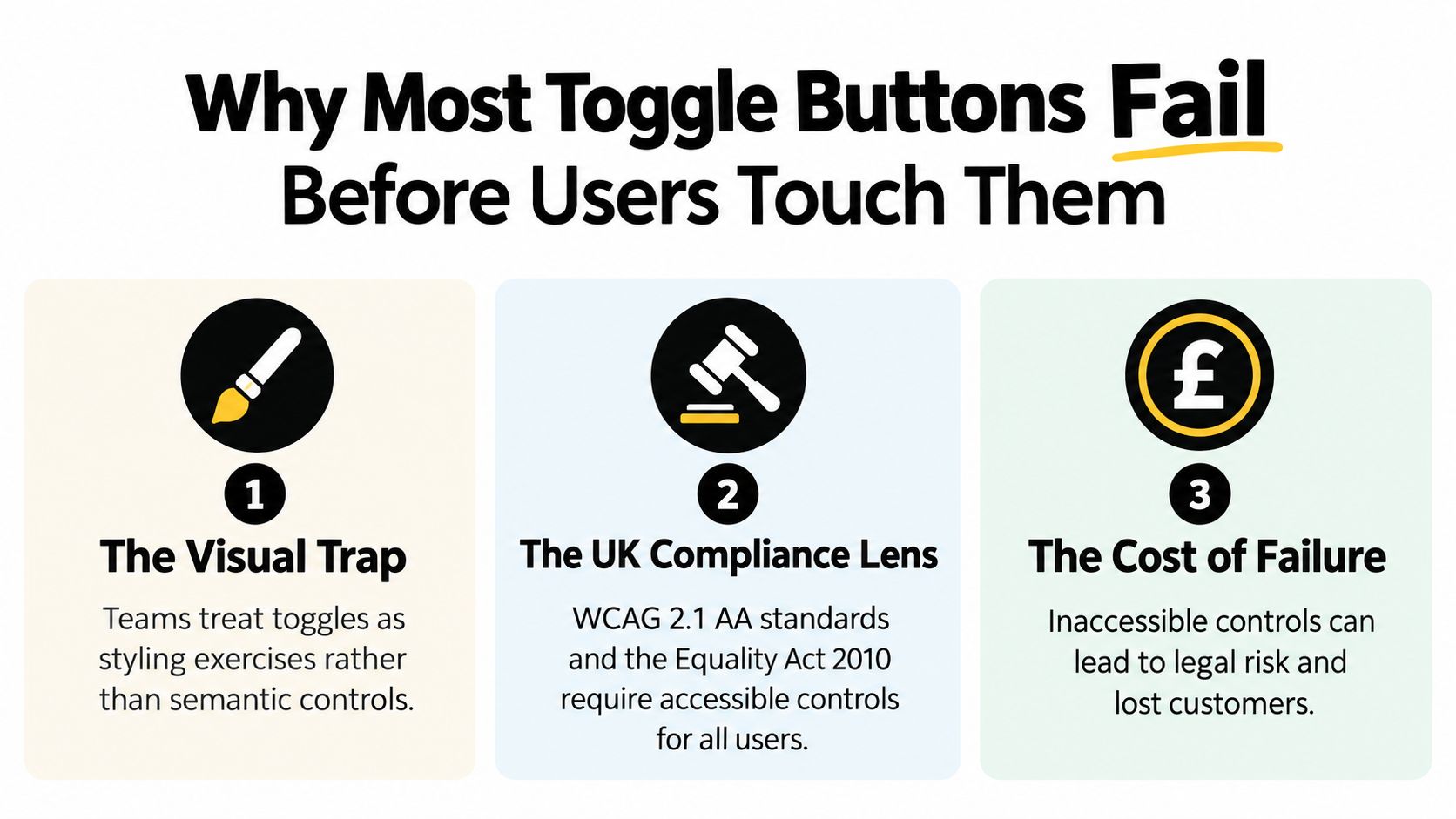
Why Most Toggle Buttons Fail Before Users Touch Them
Most failed toggles look fine. The thumb slides, the colour changes, the animation is smooth. Underneath, the control is a styled div with a click handler, no role, no keyboard support, and no way for assistive technology to tell whether it’s on or off.
That mismatch has a commercial cost in the UK, not just a technical one. The 2019 Click-Away Pound study estimated 7.15 million disabled internet users in the UK had access needs, more than 1 million higher than its 2016 edition, while 69% of disabled users, about 4.3 million people, had clicked away from websites due to accessibility barriers, according to the GOV.UK Design System accessibility statement. A toggle controlling notifications, privacy, or payments isn’t decoration for that audience. It’s the task itself.
The semantic mismatch bug
The common UK failure mode is semantic mismatch. A control looks like a switch but behaves like a link, or it accepts a mouse click while ignoring Space. Speech input users can’t name it reliably, keyboard users can’t reach it predictably, and screen reader users never hear the state change.
Three symptoms show up in code reviews again and again.
- Unstable name: The visible text swaps between Enable and Disable, so the accessible name changes at the exact moment users need a fixed reference point.
- Colour only state: On and off differ only by background colour, which fails for users who don’t perceive that colour and disappears in forced colours mode.
- Surprise context change: Activating the control moves focus, opens new content, or leaves the current page without warning.
Compliance moved from optional to documented
UK public sector teams don’t get to treat this as polish. Accessibility for covered services became a documented responsibility, with statements, testing, and evidence expected. Adopting a design system doesn’t automatically make a service accessible either, because each team still owns research, development, and testing for its own implementation.
That’s why wider interface quality matters here. If you’re auditing a settings screen, it’s worth reading Magnitude Marketing’s UI analysis on how poor interface decisions drive users away, then checking your toggles against the same standard. A control that looks finished but can’t be operated is a retention problem dressed up as a design detail.
Practical rule: If a sighted mouse user can describe the state but a keyboard or screen reader user can’t, you haven’t built a toggle. You’ve built a picture of one.
Building the Right Semantic Foundation
Start with the element the browser already understands. A toggle button is a native <button> with aria-pressed set to true or false. That gives you focusability, keyboard activation, and a role for free, before you’ve written any JavaScript.
The image below is a useful reminder of where the work happens, at the keyboard rather than in the animation layer.

The native button pattern step by step
Use a real button, not a div or a link. Give it a stable accessible name that describes the setting, such as Email notifications, and keep that name identical in both states. Flip only aria-pressed when the state changes, so assistive technology announces the same control with a different pressed value.
Don’t change context automatically when the state flips. The Public Sector Bodies (Websites and Mobile Applications) Accessibility Regulations 2018 require UK public sector sites and apps to meet accessibility requirements and publish an accessibility statement, with Home Office guidance explicitly extending the no automatic context change rule to custom toggle controls, as set out in the GOV.UK digital inclusion final report. Checking or unchecking shouldn’t move focus or load a new view.
A checkbox is a different tool. It belongs in a form, carries submission semantics, and usually waits for a save action. A styled div is worse than either, because it has no implicit role and forces you to rebuild focus, keyboard handling, and announcements by hand, badly, every time.
Ship the behaviour once as a primitive
The reliable way to stop reimplementing this is a headless primitive that owns the semantics. DOM Studio provides a framework agnostic toggle primitive with WAI-ARIA roles, focus management, and screen reader announcements wired in, plus a Vue wrapper that adds reactive props, v-model binding, and slots for the thumb. Your product team themes the wrapper. Nobody redecides the ARIA.
The short walkthrough below shows that separation of behaviour and presentation in practice.
Whatever library you use, hold it to the same test. If the primitive doesn’t preserve a stable name, expose pressed state, and keep focus put, it’s a styling component, not a toggle.
Keyboard Handling and State Announcement
Keyboard behaviour isn’t a set of nice extras. It’s a contract, and users notice within seconds when you break it. Tab should reach the toggle exactly once, the focus indicator should stay visible throughout, and activation shouldn’t throw focus somewhere else.
The screenshot below shows a production interface where that contract has to hold across every control on the page, not just the first one a tester tries.
The deterministic keyboard contract
Validate in a fixed order so failures are easy to reproduce. First, Tab lands on the control once and Shift+Tab returns to it. Second, Space toggles the pressed state while Enter activates following the button pattern, and both produce the same single state change rather than a double fire. Third, focus stays on the toggle after activation and never moves to hidden content.
NHS service manual guidance recommends testing Tab, Shift+Tab, Enter, Space, visible focus, hidden focus failures, focus traps, and scripted events across keyboard, mouse, and touch inputs when validating custom controls like toggle buttons, per the NHS accessibility development guidance. That list catches the bugs automated scans miss, particularly scripted events that behave differently per input type.
Watch for the double fire trap. If you listen for both keydown and click on Space, some browser and screen reader combinations will flip the state twice and the toggle will appear to do nothing. Handle activation through the button’s native click behaviour and let the browser do the work it already does correctly.
What the screen reader should hear
With a stable name, NVDA, JAWS, and VoiceOver can announce the setting and its pressed state as one coherent phrase. Email notifications, toggle button, pressed tells the user what the control governs and where it stands. Swap the label to Disable email notifications on activation and you’ve turned a state announcement into a riddle about what will happen next.
Network behaviour needs the same discipline. If toggling saves to a server, update aria-pressed once, reflect the change visually, and reconcile if the request fails by restoring the previous state and telling the user. Don’t flip the attribute optimistically, flip it again on response, and leave the announcement history contradicting the screen.
If your audit is surfacing problems beyond toggles, working through a structured guide to fix common accessibility issues will help you sort component level faults from page level ones. Keep the distinction clear, because a page can pass a scan while its toggles still fail every keyboard test.
A toggle that announces a new name instead of a new state forces users to relearn the control every time they touch it.
Styling With Tailwind for Every State
Styling comes last, and it has one job. It must make the existing state obvious through more than colour, without disturbing the semantics underneath. With Tailwind CSS 4 you can express every state as utilities driven by aria-pressed, so the visual layer reads from the same source of truth as assistive technology.
State styling that survives real environments
Style the track and thumb from the pressed attribute rather than a separate class your framework might forget to toggle. Utilities such as aria-pressed:bg-black for the on state, a neutral bg utility for off, and a translate utility on the thumb tied to the same attribute keep position and colour in sync. Position does the heavy lifting, because a thumb sitting at the opposite end communicates state even when colour doesn’t.
Focus needs deliberate treatment. Use focus-visible:ring with an offset so the ring appears for keyboard users without shouting on every mouse click. Never remove the outline without replacing it, and check the ring against both track colours, since a ring that works on the off state can vanish against the on state background.
Two preferences catch teams out late in a project.
- Forced colours: In Windows forced colours mode your background utilities may be overridden, so the thumb position and a visible border must still distinguish the states.
- Reduced motion: Add
motion-reduce:transition-noneso the thumb jumps instead of sliding for users who’ve asked for less animation.
Theming through a wrapper
In Vue, bind v-model to the primitive’s pressed state and slot in a Tailwind styled thumb. The wrapper owns sizing, radius, and colour tokens. The primitive keeps owning role, keyboard handling, and announcements, so a retheme can’t accidentally delete the accessibility contract.
There’s a deeper walkthrough of the CSS side in our guide to switch button CSS patterns, including how track and thumb geometry affects perceived state. Read it for the visuals, but keep the rule from this section. If a styling change requires touching ARIA, your layers are in the wrong order.
Check before you ship: Turn colour off entirely. If you can’t tell the state from thumb position alone, the styling isn’t finished.
Choosing Between Switches, Checkboxes, and Buttons
The most expensive toggle mistake isn’t a broken toggle. It’s a toggle used where a different control belonged all along. Teams reach for the switch because it looks modern, then discover users can’t tell whether the change has saved, can be undone, or has already cost them money.
Mapping user intent to the right semantic control
| User intent | Recommended control | Why it fits |
|---|---|---|
| Immediate binary preference such as notifications on or off | Switch or toggle button | The change applies at once and the state is easy to read and reverse |
| Multi option or form bound setting saved later | Checkbox | Form semantics support grouping, validation, and a separate save action |
| High impact action needing confirmation | Labelled button with explicit copy | A verb phrase plus confirmation makes consequences clear before anything happens |
This isn’t a marginal problem in UK production sites. A 2025 UK accessibility audit reported that 48% of websites across 14 sectors needed accessibility improvements, while travel and tourism websites performed worst at 79% requiring improvement, according to the UK accessibility standards publication. Wrong component choices sit comfortably inside that picture, because they pass visual review and fail real tasks.
When a plain checkbox beats a polished switch
Here’s the contrarian point worth defending in design review. If the setting doesn’t apply immediately, a checkbox is usually the more honest control. It sits naturally in a form, it groups with related options, and it sets the expectation that a save button comes later. A switch in the same spot promises instant effect and then breaks that promise.
Our breakdown of the checkbox input type and its form behaviour covers the submission and grouping semantics in detail. Use it when a colleague argues that a switch and a checkbox are interchangeable skins. They aren’t, and screen readers announce them differently because they mean different things.
Destructive settings need even more distance from the switch pattern. Deleting an account, disabling a payment method, or opting into a costly plan shouldn’t happen because someone brushed a thumb control on a phone. Use a clearly labelled button, explanatory text about the consequence, and a confirmation step. If the action is irreversible, a binary control with no friction isn’t a convenience. It’s a liability.
Ask one question before choosing. Does this change apply instantly, reversibly, and harmlessly? If any answer is no, the toggle is the wrong component, however good it looks in the mockup.
Testing Toggles as a Release Gate
Treat toggle testing as a release gate, not a final automated scan. Automated tools can confirm that aria-pressed exists. They can’t tell you whether focus survives activation, whether VoiceOver announces the change, or whether the state is still correct after a reload.
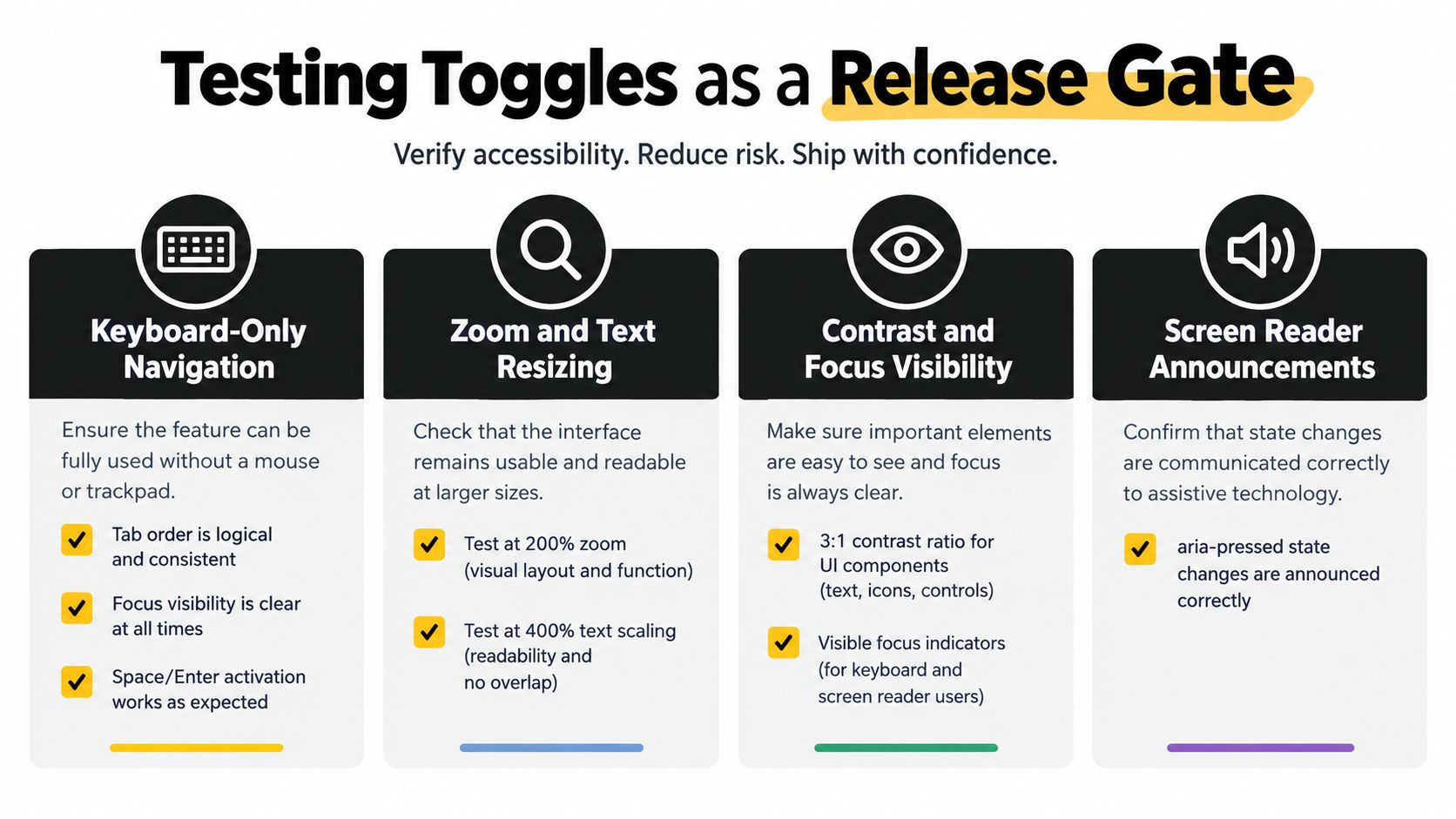
The infographic below summarises the matrix worth running before a toggle ships.
A matrix that produces evidence
Build the matrix across input and display conditions, then record pass or fail for each state. Cover keyboard only navigation, zoom and text resizing, contrast and focus visibility, at least one desktop screen reader such as NVDA or VoiceOver, mobile assistive technology such as TalkBack or VoiceOver, pointer and touch activation, and state persistence after reload or navigation.
For each toggle, record the accessible name, role, pressed state, focus order, and the effect triggered. That record is what turns an accessibility claim into evidence. It is also what makes regressions obvious when a later redesign removes the focus ring.
The need for evidence is clear in UK monitoring figures. UK monitoring data in 2026 showed 75% of surveyed organisations reported meeting WCAG 2.0 AA or higher, while 11% still did not know whether their service met the standard, as reported in the GOV.UK inclusion monitoring report for 2026. Self reported compliance and verified component behaviour are different things, and only one of them helps your users.
Lock it in with regression tests
Add automated tests for the deterministic parts. Assert that Space activation sets aria-pressed to true, that a second activation returns it to false, and that focus remains on the control afterwards. Those three assertions catch the semantic mismatch and double fire bugs that recur across teams.
Structuring that work well matters as much as writing the tests, and it’s worth studying established testing frameworks for predictable releases if your release process still treats accessibility checks as manual and optional. Pair that discipline with practical component testing patterns so the toggle contract is verified at the primitive level, once, rather than rediscovered in every product that consumes it.
A Contract You Can Pin in Your Repo
Pin these guarantees in your component library README and review pull requests against them.
- Native element: Real button, stable accessible name,
aria-pressedexposed. - Keyboard contract: Tab once, deterministic Space and Enter, focus retained.
- Dual channel state: Thumb position plus styling that doesn’t rely on colour alone.
- Environment proof: Forced colours and reduced motion handled.
- Evidence: Regression tests covering both pressed states.
Build the contract once, ship it as a primitive, and let every team consume it without redeciding accessibility.
If you’re tired of rebuilding the same toggle contract in every project, DOM Studio ships headless toggle primitives with the ARIA, focus management, and keyboard behaviour already wired in, plus a Vue layer with v-model and slots for your own Tailwind styling. Browse the toggle components, drop one into your settings page, and spend your review time on product decisions instead of pressed state bugs.