
TL;DR
Build an AI agent tool results UI around application-owned operation state, not the assistant’s wording. Validate complete results, render them with known Vue components, and distinguish a proposed action from approval, execution, and confirmed completion. Keep evidence inspectable, reconcile uncertain outcomes before retrying writes, and test malformed data, duplicate submissions, and accessibility.
An agent returns three projects and suggests archiving them. The useful interface is not another paragraph saying “I found some inactive projects.” It is a readable result, an inspect action, and a separate decision showing exactly which projects would change.
In this guide, we’ll build that boundary. We’ll create a small Vue result renderer, connect its responsibilities to DOM Studio’s documented extension points, and design approvals that do not masquerade as completed work.
Our AI components overview makes the integration boundary explicit: the components provide the interface; your application connects the model, tools, data, and transport. They do not supply backend authorization or automatically execute an approved operation.
Table of contents
- Before you start
- 1. Model the tool lifecycle before choosing a card
- 2. Validate result data into a narrow display contract
- 3. Choose the result surface around the next decision
- 4. Render a validated result in a Vue component
- 5. Connect the renderer to DOM Studio without delegating authority
- 6. Make approval specific, then reconcile execution
- 7. Preserve meaning during streaming, failure, and responsive changes
- 8. Verify the contract with adversarial fixtures
- Ship one complete tool-result workflow
- Sources
- Recommended Reads
Before you start
Prepare these inputs:
- A Vue 3 application with Single File Component support.
- An authenticated backend that owns tool execution, permissions, and durable operation records.
- Stable conversation, message, tool-call, and operation identifiers.
- Complete JSON result snapshots, or a stream adapter that assembles and validates them.
- A server-owned proposal record for consequential actions, including its targets and revision.
The code below uses Vue 3 APIs and native HTML. It does not require an agent SDK. DOM Studio’s installation guide covers its Vue 3 and Tailwind CSS v4 setup when you integrate the surrounding workspace.
Transport, authentication, proposal validation, routing, and persistence are application-specific pieces, not hidden functionality in these examples. The renderer is intentionally read-only; its buttons emit intent to the parent.
1. Model the tool lifecycle before choosing a card
Separate three questions: What was requested? What has actually happened? What data came back?
Keep the original intent and arguments alongside an operation record. Store returned data separately from execution status. A payload containing success: true must not override the status established by your execution service.
For this guide, we use the following application states. These are our design vocabulary, not DOM Studio enums or a native agent-protocol contract.
| State | What the interface says | What must not be implied |
|---|---|---|
| Requested | Request received | Execution has started |
| Awaiting approval | Review this proposal | The change is authorized or applied |
| Queued | Approved action queued | The worker has finished |
| Running | Searching or applying changes | The outcome is known |
| Completed | Confirmed result available | Every related operation also succeeded |
| Failed | A known failure occurred | No partial effects occurred |
| Cancelled | Cancellation confirmed | Earlier effects were reversed |
| Checking outcome | Connection lost; checking status | The operation definitely failed |
A read-only lookup might move directly from requested to running. A write may require a proposal, approval, and queueing first. Checking the outcome is a recovery path, not a mandatory stage of every successful operation.
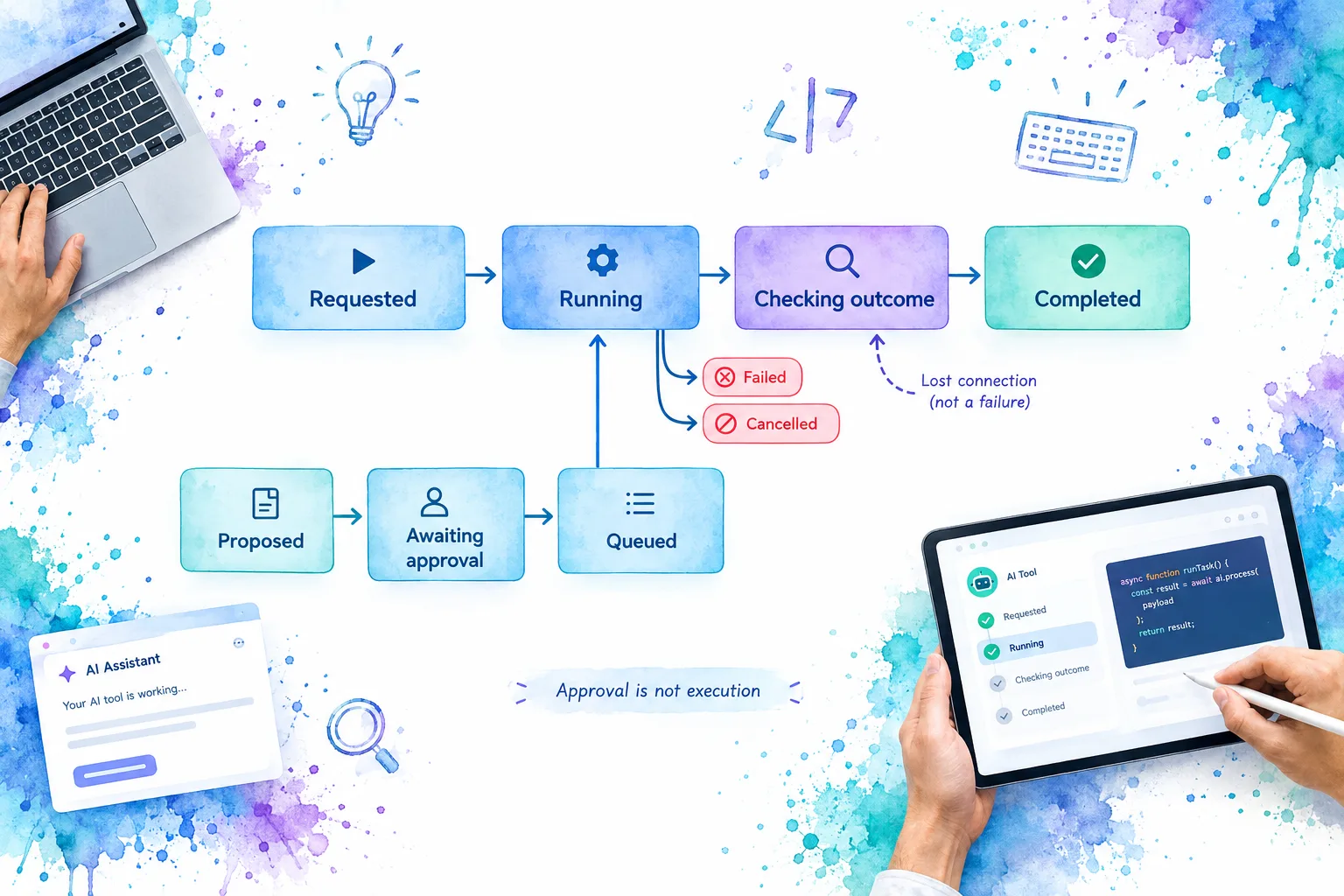
Give an operation an identity that survives navigation and reconnects. An attempt identifier can distinguish retries, while an operation identifier lets the interface find the durable outcome.
Check: disconnect after submission. The UI should still know which operation to query. If it can only create a new request, the lifecycle contract is incomplete.
2. Validate result data into a narrow display contract
Treat tool output as untrusted data, even when it looks like ordinary JSON. OWASP’s AI Agent Security guidance recommends validating outputs and enforcing tool permissions outside the agent’s context.
Start with a small result kind rather than accepting arbitrary components, event handlers, or HTML. Save this as project-result.js:
const projectStates = new Set(['active', 'inactive', 'archived']);

function isRecord(value) {
  return value !== null && typeof value === 'object'
    && !Array.isArray(value);
}

function hasText(value, maximum) {
  return typeof value === 'string'
    && value.trim().length > 0
    && value.length <= maximum;
}

export function parseProjectResult(raw) {
  if (!isRecord(raw)
    || raw.kind !== 'project-list'
    || raw.version !== 1
    || !hasText(raw.title, 120)
    || !Array.isArray(raw.rows)
    || raw.rows.length > 100) {
    return null;
  }

  const ids = new Set();
  const rows = [];

  for (const row of raw.rows) {
    if (!isRecord(row)
      || !hasText(row.id, 80)
      || !hasText(row.name, 160)
      || !projectStates.has(row.status)
      || ids.has(row.id)) {
      return null;
    }

    ids.add(row.id);
    rows.push({ id: row.id, name: row.name, status: row.status });
  }

  return { kind: 'project-list', version: 1, title: raw.title, rows };
}
This parser supports one complete result version with at most 100 rows. An empty array is valid. An absent array, duplicate ID, unknown project status, or unsupported version is not. Unknown properties are discarded rather than spread into component props.
The limits are example product decisions, not framework limits. Add an explicit pagination contract for larger datasets instead of silently truncating them. Enforce response byte limits before parsing, and apply authorization and sensitive-data filtering on the server as well.
A frontend parser improves presentation safety; it cannot grant access to a project or permission to archive it.
Check: pass an empty list and then a malformed row. The first should produce a genuine empty state. The second should produce an unsupported-result state, never “No projects found.”
3. Choose the result surface around the next decision
We recommend choosing a surface from the task, not from how impressive the generated output looks.
Use a summary card when someone needs a quick answer: the lookup completed, three records were returned, and the next step is inspection. Keep the headline tied to the returned scope. “Showing three projects” is safer than “All inactive projects” when completeness is unknown.
Use a table when people compare repeated fields. Give projects consistent columns and row-level inspect actions. Do not put unrelated records into a table simply because the payload is an array.
Use a detail view when one result needs explanation, source excerpts, or before-and-after values. Show the concise answer first, with authorized diagnostic data available separately.
Use a decision prompt when the next interaction changes something. It should name the exact action, targets, and consequences, with a clear way to decline.
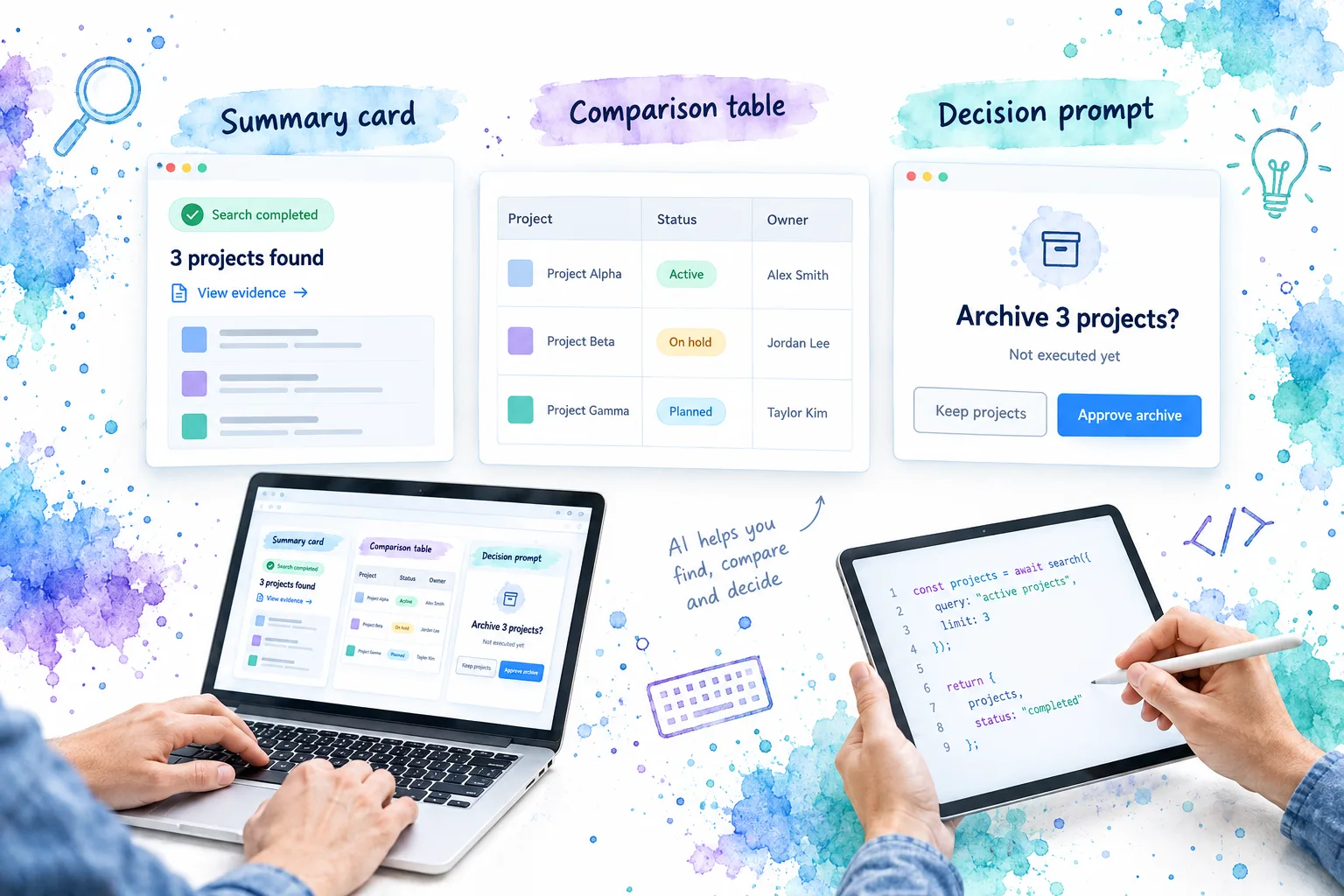
These are complementary surfaces. A summary can introduce a table, and a table can open a detail view. Approval should remain distinct from all three so that a completed lookup does not look like a completed mutation.
For evidence-bearing results, include source record identifiers, retrieval times where relevant, and links your backend has checked. Explain missing evidence directly. Vue’s security guide notes that escaping an attribute does not make an untrusted URL safe.
Check: ask someone to identify what has happened and what is merely suggested without reading the surrounding chat. If they cannot, revise the result labels before adding visual polish.
4. Render a validated result in a Vue component
Save the following as ProjectResults.vue beside the parser. The parent supplies payload and an application-owned phase.
We use computed() to derive the display model. Vue’s <script setup> supports the prop and event declarations used here.
<script setup>
import { computed } from 'vue';
import { parseProjectResult } from './project-result.js';

const props = defineProps({
  payload: { default: null },
  phase: { type: String, default: 'requested' },
});
const emit = defineEmits(['inspect-project']);

const labels = new Map([
  ['requested', 'Project search requested'],
  ['awaiting_approval', 'Waiting for review'],
  ['queued', 'Operation queued'],
  ['running', 'Searching projects'],
  ['completed', 'Project search completed'],
  ['failed', 'Project search failed'],
  ['cancelled', 'Project search cancelled'],
  ['checking_outcome', 'Checking the search outcome'],
]);

const statusText = computed(() =>
  labels.get(props.phase) || 'Unknown execution state',
);
const result = computed(() =>
  props.phase === 'completed' ? parseProjectResult(props.payload) : null,
);
</script>

<template>
  <section class="tool-result">
    <p role="status">{{ statusText }}</p>

    <template v-if="result">
      <h3>{{ result.title }}</h3>
      <p>{{ result.rows.length }} projects returned.</p>
      <p v-if="result.rows.length === 0">No projects matched this search.</p>

      <div v-else class="table-scroll" role="region"
        aria-label="Project results" tabindex="0">
        <table>
          <caption>Returned projects</caption>
          <thead>
            <tr>
              <th scope="col">Project</th>
              <th scope="col">Status</th>
              <th scope="col">Action</th>
            </tr>
          </thead>
          <tbody>
            <tr v-for="row in result.rows" :key="row.id">
              <th scope="row">{{ row.name }}</th>
              <td>{{ row.status }}</td>
              <td>
                <button type="button"
                  @click="emit('inspect-project', row.id)">
                  Inspect {{ row.name }}
                </button>
              </td>
            </tr>
          </tbody>
        </table>
      </div>

      <details>
        <summary>View validated result data</summary>
        <pre>{{ JSON.stringify(result, null, 2) }}</pre>
      </details>
    </template>

    <p v-else-if="phase === 'completed'">
      The search finished, but this result format cannot be displayed.
    </p>
    <p v-else>Results will appear when a supported result is confirmed.</p>
  </section>
</template>

<style scoped>
.tool-result { min-width: 0; }
.table-scroll { max-width: 100%; overflow-x: auto; }
table { width: 100%; border-collapse: collapse; }
th, td { padding: 0.75rem; text-align: left; border-bottom: 1px solid #ccc; }
pre { white-space: pre-wrap; overflow-wrap: anywhere; }
button:focus-visible, .table-scroll:focus-visible {
  outline: 3px solid #2456a6;
  outline-offset: 3px;
}
</style>
The inspect button emits a project ID. It does not navigate to a tool-provided URL or call a mutation endpoint. Connect that event to application routing and recheck access when fetching the detail record. Vue’s component events documentation explains this child-to-parent event boundary.
The disclosure shows only the projected, validated fields, not the original payload. Any broader inspector needs its own access checks and redaction policy.
Check: render project names containing angle brackets. They should remain text. Do not replace interpolation with v-html or compile a tool response as a template; Vue explicitly warns against untrusted templates.
5. Connect the renderer to DOM Studio without delegating authority
DOM Studio’s agent-chat reference documents two relevant extension points:
toolComponentsmaps a tool’srendererKeyor name to a known component. Unmapped tools use the generic card.- The conversation’s
#toolslot exposes{ tool, message, component, action }for custom tool rendering.
Use the map for reusable, tool-specific renderers. Use the slot when an application adapter needs to join a tool part to a separately stored operation. Verify these contracts against the documentation accompanying your installed package before integrating.
Our ProjectResults.vue accepts payload and phase; it is not a drop-in renderer expecting DOM Studio’s full tool part and parent message. Add a wrapper that projects those records into our local contract. The wrapper should resolve the operation from your store, validate its scope, and pass the resulting display fields down.
Keep incoming tool names and renderer keys inside an application allowlist. A matching renderer is a presentation choice, not permission to execute that tool. Unknown tools should fall back to a restricted, redacted display without automatically gaining approval controls.
The agent workspace demo is the useful next reference for message parts and custom tool cards. Adapt its integration points rather than treating demo transport as production infrastructure. This guide assumes no native support for any particular agent protocol; a protocol adapter is a separate application responsibility.
For a complementary architectural discussion, watch Bala Ramdoss’s conference talk, Agent Output Is Not UX: Rendering Layer Your LLM Pipeline Is Missing. It is background on the rendering problem, not a Vue or DOM Studio API tutorial.
Check: introduce an unknown tool name. The conversation should remain readable, while the application refuses to infer a new executable capability from that name.
6. Make approval specific, then reconcile execution
Suppose the search returns three inactive projects. A separate server-owned proposal identifies the exact projects eligible for archiving. The approval surface should show their names, destination workspace, relevant before-and-after state, and the consequences of archiving.
“Continue” is too vague. Use “Approve archive” or “Archive 3 projects,” with “Not executed yet” beside the proposal. Do not let model-generated copy hide targets or redefine the action.
Here is an inline approval panel, not a modal dialog. Its parent must supply an already validated, permission-filtered proposal containing id, revision, projects: [{ id, name }], and consequence.
<script setup>
defineProps({
  proposal: { type: Object, required: true },
  phase: { type: String, required: true },
  busy: { type: Boolean, default: false },
});
const emit = defineEmits(['approve', 'reject']);
</script>

<template>
  <section v-if="phase === 'awaiting_approval'">
    <h3>Archive {{ proposal.projects.length }} projects?</h3>
    <p>Not executed yet. {{ proposal.consequence }}</p>
    <ul>
      <li v-for="project in proposal.projects" :key="project.id">
        {{ project.name }}
      </li>
    </ul>
    <button type="button" :disabled="busy"
      @click="emit('reject', {
        proposalId: proposal.id, revision: proposal.revision,
      })">
      Keep projects
    </button>
    <button type="button" :disabled="busy"
      @click="emit('approve', {
        proposalId: proposal.id, revision: proposal.revision,
      })">
      Approve archive
    </button>
  </section>
</template>
Prop declarations are not a security validator. The normalized proposal contract and backend checks remain required. In the parent handler, set pending state synchronously before awaiting the request. Preserve the proposal if approval fails, and display the returned reason.
Approval should be bound to the actor, workspace, exact targets, parameters, proposal revision, and expiry. Recheck authorization immediately before execution. If targets or parameters change, require fresh approval. These boundaries follow OWASP’s transaction authorization guidance.
For concurrent requests, enforce duplicate protection in shared server state. Scope an idempotency key to the operation and actor, bind it to a request fingerprint, and return the existing operation for a matching retry. Reject reuse with different parameters. Reserve the operation and consume approval atomically where your storage supports it.
That still does not make a remote side effect exactly-once. Your worker and downstream tool need compatible duplicate handling or reconciliation. If the worker loses contact after sending a write, show “Checking outcome” and investigate the existing operation before resubmitting it.
An accepted approval response may mean queued, not completed. Show success only after the authoritative operation receipt confirms the actual changes, including partial outcomes.
Check: submit the same approval twice, including from two tabs. A disabled button alone is not the pass condition. The server must prevent duplicate effects or return an explicit unresolved outcome for reconciliation.
7. Preserve meaning during streaming, failure, and responsive changes
Streaming text and validated result snapshots are different inputs. Buffer incomplete structured data until a complete, bounded snapshot passes validation. If your protocol supports independently valid partial records, define that contract explicitly; do not assume arbitrary JSON fragments are renderable.
Merge updates by stable message and tool-call identity. Use server revisions or sequence numbers to reject stale updates, and resynchronize when a sequence gap appears. Otherwise, a late running event can overwrite a completed operation or resurrect an outdated approval.
Recovery labels should tell people what remains possible:
- Known failure: preserve valid context and explain whether the operation can safely retry.
- Lost connection or timeout: check the existing operation before offering another write.
- Cancellation requested: keep this distinct from confirmed cancellation; earlier changes may remain.
- Expired approval: fetch a fresh proposal rather than reusing the old decision.
Keep execution failure separate from display failure. A completed tool whose payload cannot be rendered may need a supported inspector, not another execution attempt.
For accessibility, expose meaningful status changes without moving focus. The persistent role="status" paragraph in our result component is intended for coarse lifecycle updates, not every streamed token. Test announcement frequency with assistive technology, following W3C’s status-message guidance.
If approval uses a modal instead of the inline panel, implement focus entry, contained keyboard navigation, dismissal, and appropriate focus return using the W3C modal-dialog pattern. Adding an ARIA role alone does not create those behaviors.
On small screens, keep the action, target summary, and consequence together. Let comparison tables scroll within their own region rather than widening the entire conversation. Do not hide the affected records behind a desktop-only aside.
Check: review a long proposal using only the keyboard at a narrow viewport. Its decline action must remain discoverable, and incoming results must not steal focus.
8. Verify the contract with adversarial fixtures
Test the state reducer, result parser, renderer, and execution endpoint separately, then run the complete flow. These are verification tasks to perform in your application, not claims that the examples have been executed here.
| Fixture or interaction | Expected behavior |
|---|---|
| Empty valid result | Genuine empty state, not a parsing error |
| Missing rows, duplicate IDs, or unknown version | Unsupported-result message; no invented data |
| Incomplete streamed JSON | Working state until a complete snapshot validates |
| Script-shaped project name | Visible text, never executable markup |
| Unknown renderer key | Restricted fallback; no new executable action |
| Older event after completion | Confirmed state remains authoritative |
| Permission revoked after review | Server rejects execution despite visible approval |
| Proposal changes before approval | Stale revision rejected; fresh review required |
| Double submission from two tabs | Existing operation returned or duplicate safely rejected |
| Timeout after a write | Outcome reconciliation before another attempt |
| Partial mutation success | Actual per-target outcomes remain visible |
| Keyboard and screen-reader review | Usable controls, stable focus, meaningful announcements |
Also test navigating away and returning while a tool runs. The operation should be recoverable from durable application state, not tied to the lifetime of one Vue component.
If a test fails, repair the owning layer. A malformed result belongs at the contract boundary. Repeated side effects belong in execution control. A lost keyboard position belongs in the interface. Changing assistant wording cannot fix those defects.
Ship one complete tool-result workflow
The completed outcome is a tool result people can inspect, a proposal they can understand, and an operation whose real outcome remains visible even when the connection fails.
Start with one read-only lookup and one consequential action. Wire the validated result into the agent workspace demo’s extension points, then run the verification matrix before adding more tool types. If the surrounding UI is not installed yet, follow the DOM Studio installation guide.
Sources
- DOM Studio: AI components and integration boundaries
- DOM Studio: Agent-chat renderer map, slots, and events
- DOM Studio: Installation requirements
- Vue: Script setup, computed state, and component events
- Vue: Security best practices
- OWASP: AI Agent Security
- OWASP: Transaction Authorization
- W3C: Status Messages and Modal Dialog Pattern
- AI Engineer: Agent Output Is Not UX