
TL;DR
If vue-select displays an ID instead of a label, check whether the complete selected option exists in options. With reduce, storing the correct identifier is not enough to resolve its label. Then check the label field, identifier types, and the parent’s update handler. The official value-binding guide documents this reduced-value caveat. Match examples to your installed package version before changing bindings.
This reference covers Vue Select, the vue-select package maintained in the sagalbot repository. It is not a guide to every Vue dropdown or to DOM Studio’s separate controls. We focus on selected-value and displayed-label mismatches, with direct routes to the official documentation rather than a replacement for its full API.
Table of contents
- Official vue-select documentation and version reference
- Symptom lookup: what to inspect first
- Separate the option, model value, and label
- A minimal Vue 3 reproduction with a pinned version
- Resolve asynchronous options without losing the selection
- Trace model updates separately from display updates
- Regression checks before returning to the full form
- Use the reference for your actual component
- Sources
- Recommended Reads
Official vue-select documentation and version reference
Start with the page that answers your immediate question:
| Need | Official reference |
|---|---|
| Installation and Vue compatibility | Installation guide |
v-model, objects, identifiers, and reduce |
Getting and Setting |
| Option arrays and display fields | Options Prop |
| Search-triggered remote loading | Loading Options with AJAX |
| Individual configuration properties | Props reference |
The installation guide pairs Vue 2 with Vue Select 3.x and Vue 3 with the 4.x beta channel. Do not confuse the Vue framework version with the Vue Select package version.
| Installed combination | Explicit selection prop | Selection update event |
|---|---|---|
| Vue 2 with Vue Select 3.x | value |
input |
| Vue 3 with Vue Select 4.0.0-beta.6, used below | modelValue |
update:modelValue |
The older contract appears in the value-binding documentation; the Vue 3 contract is established by the pinned beta component source. Check your lockfile before copying an event handler. Changing a label field will not repair a mismatched binding contract.
Symptom lookup: what to inspect first
The official reduced-value caveat and option-label rules provide the starting points for this diagnostic table.
| Symptom | First inspection | Next action |
|---|---|---|
The field shows 42 instead of “Design system” |
Is the complete record for ID 42 available? |
Resolve and include the selected option. |
| An object produces an empty or unexpected label | Does the configured label key exist? | Match the label prop to the real data field. |
| Selection appears to revert | Does the parent accept and return the emitted value? | Trace the update path before changing display code. |
| The label breaks after searching | Did remote results replace the selected record? | Keep selected records available alongside results. |
| Multiple selection behaves inconsistently | Is the model an array with a consistent element shape? | Align the model with multiple and reduce. |
Capture the model, its type, and the actual options passed into the component at the same moment. Comparing yesterday’s API response with today’s rendered state can send the investigation in the wrong direction.
Separate the option, model value, and label
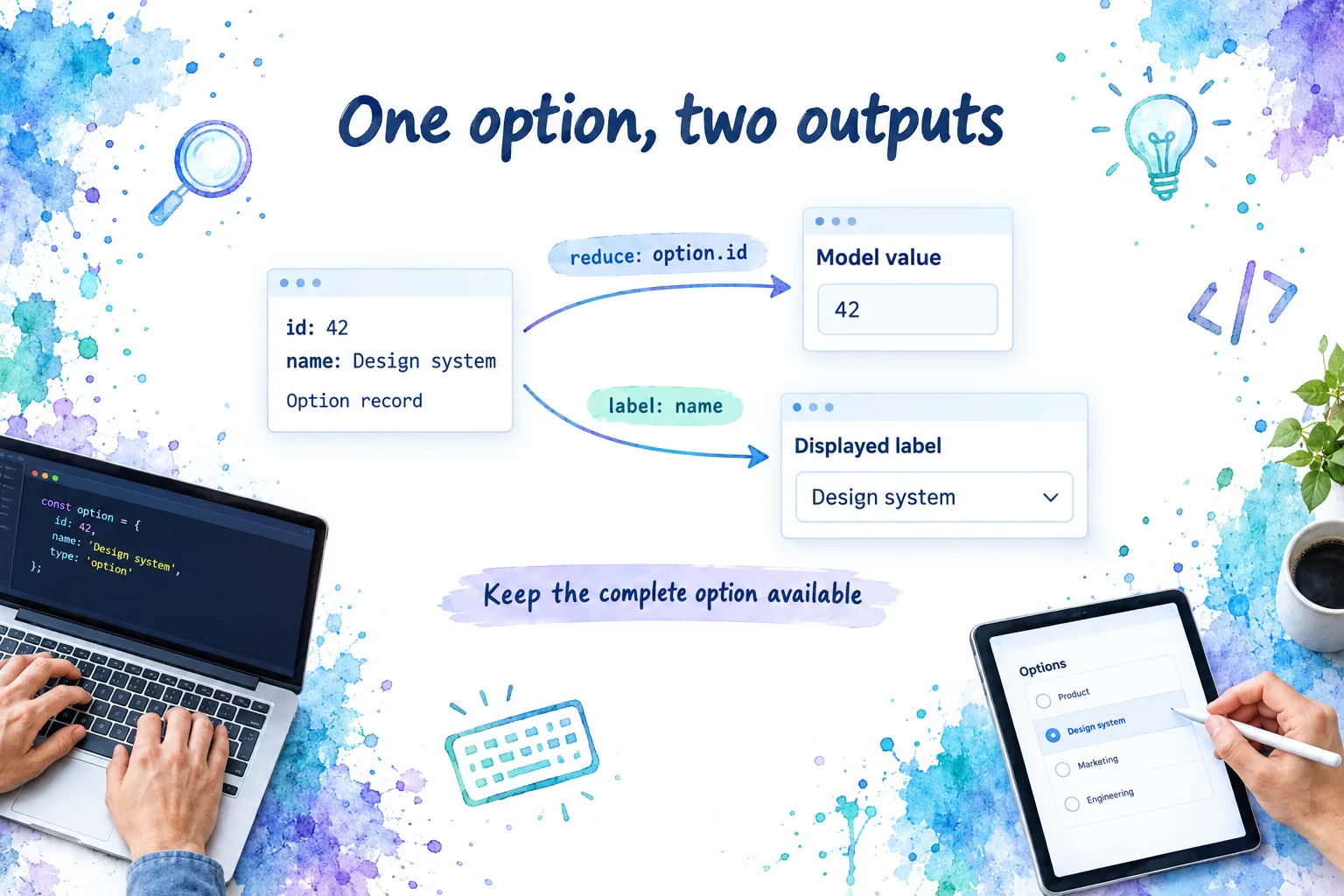
An option record can serve two different outputs:
- Model value: what the application stores or submits.
- Displayed label: what the person sees in the field.
For the example record { id: 42, name: 'Design system' }, label="name" identifies the display field. A reducer such as option => option.id produces the stored identifier. Without a reducer, object options return the whole object. These behaviors are documented in the selection transformation guide.
Check the model’s shape
Decide whether this field owns an option object or an identifier, then use that contract consistently through initialization, selection, persistence, and reload.
| Configuration | Expected selected-value shape |
|---|---|
| Primitive options | A selected primitive |
Object options without reduce |
The selected option object |
Object options reduced to id |
The selected identifier |
multiple enabled |
An array of the corresponding values |
Vue Select’s reduce tests cover preselected identifiers, object options, multiple values, and custom label keys.
An application that initializes with an object but later assigns an ID has changed its contract halfway through the interaction. Fix that boundary rather than adding a formatter to hide it.
Check the field and identifier type
Vue Select looks for an object’s label field by default; choose another key explicitly when your data uses name or another property. See the option-label reference.
Also compare types. Numeric 42 and string "42" do not match in the reduced-value lookup used by beta.6. Its implementation compares serialized reduced values. Normalize identifiers at your application boundary, and choose a reducer that uniquely identifies each option.
A minimal Vue 3 reproduction with a pinned version
Use an existing Vue 3 project that compiles single-file components and supports <script setup>. This example intentionally targets Vue Select 4.0.0-beta.6, a prerelease, rather than an unqualified moving package tag. It is a diagnostic fixture, not a recommendation to upgrade your production application.
npm install vue-select@4.0.0-beta.6
The pinned release’s entry point exports the component as a default export. Its package manifest declares Vue 3 compatibility and the CSS import path. Use the imports for this exact release, not a different branch’s example.
<script setup>
import { ref } from 'vue'
import VSelect from 'vue-select'
import 'vue-select/dist/vue-select.css'

const workspaceId = ref(42)
const workspaces = ref([
  { id: 42, name: 'Design system' },
  { id: 73, name: 'Marketing site' },
])

function acceptSelection(nextId) {
  workspaceId.value = nextId
}
</script>

<template>
  <label for="workspace">Workspace</label>
  <VSelect
    input-id="workspace"
    :model-value="workspaceId"
    @update:modelValue="acceptSelection"
    :options="workspaces"
    :reduce="option => option.id"
    label="name"
  />
  <p>Stored ID: {{ workspaceId === null ? 'None' : workspaceId }}</p>
</template>
Vue’s reactivity guide explains the ref and <script setup> behavior used here. The package’s reduce tests establish the corresponding preselection and label mapping.
The expected initial label is “Design system,” while the stored value is 42. Selecting “Marketing site” should change the stored value to 73. To investigate a missing initial option, initialize the model to 99 without adding that record.
The explicit prop and event pair makes the update boundary visible. You can replace that pair with v-model="workspaceId" once the behavior is understood. This fixture deliberately excludes your store, API client, validation, and persistence logic. Introduce those pieces one at a time.
Resolve asynchronous options without losing the selection
A saved form can load its identifier before it loads the corresponding option. For example, an edit response contains workspace ID 42, but the first page of searchable workspaces does not contain that workspace. The identifier may be valid even though the UI lacks its display record.
We recommend treating selected records and current search results as separate application concerns:
- Read the saved identifier.
- Resolve its complete option record through an authorized lookup or the form response.
- Include that record in the options supplied to the select.
- Merge later results by identifier rather than blindly discarding selected records.
- Refresh or remove stale records deliberately when permissions or underlying data change.
This is an application data-loading strategy built around Vue Select’s requirement for the complete reduced option, not an automatic fetching feature.

The reactive-options tests include an initially empty options array that later receives a matching record. They also establish that changing options does not reset selection by default. Inspect resetOnOptionsChange if your integration deliberately enables clearing.
Do not rely only on selecting an option after loading. Test a fresh mount with a saved ID, since that is the path your edit screen must support. Include a valid zero identifier in asynchronous tests if your domain uses one. For beta.6 specifically, the options watcher gates re-resolution on a truthy model value, so a cold-loaded 0 deserves a separate check against the pinned source.
If an identifier no longer resolves, distinguish loading from “unavailable.” Do not silently replace it with the first result or invent a label. Decide whether the user must choose a replacement, retain a historical value, or see an authorization-safe message.
Keep remote search under application control
The AJAX guide documents @search, its search-string and loading-callback arguments, and :filterable="false" for disabling client filtering when appropriate. The parent owns the request.
In your loading layer, debounce where useful, prevent stale responses from replacing newer results, and expose failures separately from empty results. An old request finishing last can otherwise undo a correct options update. Debouncing alone does not guarantee response order.
Trace model updates separately from display updates
A correct label does not prove that the parent stored the selection. An incorrect label does not prove that the stored value is wrong.
Inspect these boundaries in order:
- Emitted value: Does selecting an option emit the expected ID or object?
- Parent assignment: Does the handler or writable store adapter accept that value?
- Returned prop: Does the component receive the new value on the next update?
- Label resolution: Can the returned value resolve to an available option and its display field?
Vue’s component v-model guide describes the Vue 3 prop-and-event contract. If a wrapper is involved, follow the value across both component boundaries. A handler that updates an unrelated local ref will not repair the authoritative parent value.
For a visual refresher, LearnVue’s V-Model in Vue Simplified explains the underlying binding concept. It is a Vue lesson, not version-specific Vue Select documentation.
If the parent value updates correctly but the selected text remains wrong, temporarily remove custom rendering and inspect the label configuration. Vue Select’s props reference distinguishes label generation from display customization through the option and selected-option slots.
Regression checks before returning to the full form
Use a small fixture and assert the visible label and stored value separately:
| Scenario | What to verify |
|---|---|
| Saved ID with preloaded options | The intended label appears without user interaction. |
| Saved ID before options arrive | The matching record resolves after loading, including any valid zero-ID case. |
| Search results replaced | The selection follows your retention policy. |
| Number/string mismatch | Boundary normalization produces a consistent identifier type. |
| User selects another option | The parent receives and returns the expected value. |
| Selection cleared | The parent accepts the agreed empty state. |
| Selected record unavailable | The UI distinguishes missing data from pending loading. |
For beta.6, clearing emits null in single mode and [] in multiple mode, as shown in its selection implementation. Keep these states distinct from valid identifiers in your own guards.
Use the reference for your actual component
The useful debugging habit is to inspect value ownership and label resolution separately. The exact props and events remain package-specific.
If you are diagnosing one of our controls instead, open DOM Studio’s combobox reference or native select reference. Those pages document our own contracts and examples. They are not documentation for vue-select, and its reduce configuration should not be copied into them by assumption.
Sources
- Vue Select: Installation, Getting and Setting, and Options Prop.
- Vue Select: Loading Options with AJAX and Props reference.
- Vue Select 4.0.0-beta.6: Component source, default export, and package manifest.
- Vue Select 4.0.0-beta.6: Reduce tests and reactive-options tests.
- Vue: Component v-model and Reactivity Fundamentals.
- LearnVue: V-Model in Vue Simplified.
- DOM Studio: Combobox and Native Select.