
You import one small function, ship your work, and then wonder why the page feels heavy on a phone. You’re not imagining it. Many teams inherit bundles full of code their pages never run, and they blame the bundler when the problem is shared between the library, the imports, and the route itself.
Tree shaking helps, but only when all three sides do their part. The bundler has to prove code is unused, the library has to expose code it can analyse, and your application has to import narrowly and load features at the right time. Get one side wrong and you’ll still ship dead weight.
Table of Contents
- What Tree Shaking Removes from Your Bundle
- Blockers, Symptoms and Fixes That Stop Dead Code Removal
- How Bundlers Decide What Is Dead Code
- Writing Libraries That Tree Shake Well
- Checking Elimination in a Production Build
- Where Tree Shaking Stops Helping
- Set a JavaScript Budget Before Your Next Release
What Tree Shaking Removes from Your Bundle
Say you import one date-formatting function from a utility library that contains 200 functions. You expected the browser to download that one function. Instead, without effective elimination, it downloads all 200, including parsers, locale helpers, and maths utilities your page never calls.
Think of a gardener pruning a shared tree. The living limbs are the exports your application reaches. The dead branches are exports nothing imports. Tree shaking cuts the dead branches before delivery, so only the living parts remain in the production bundle.
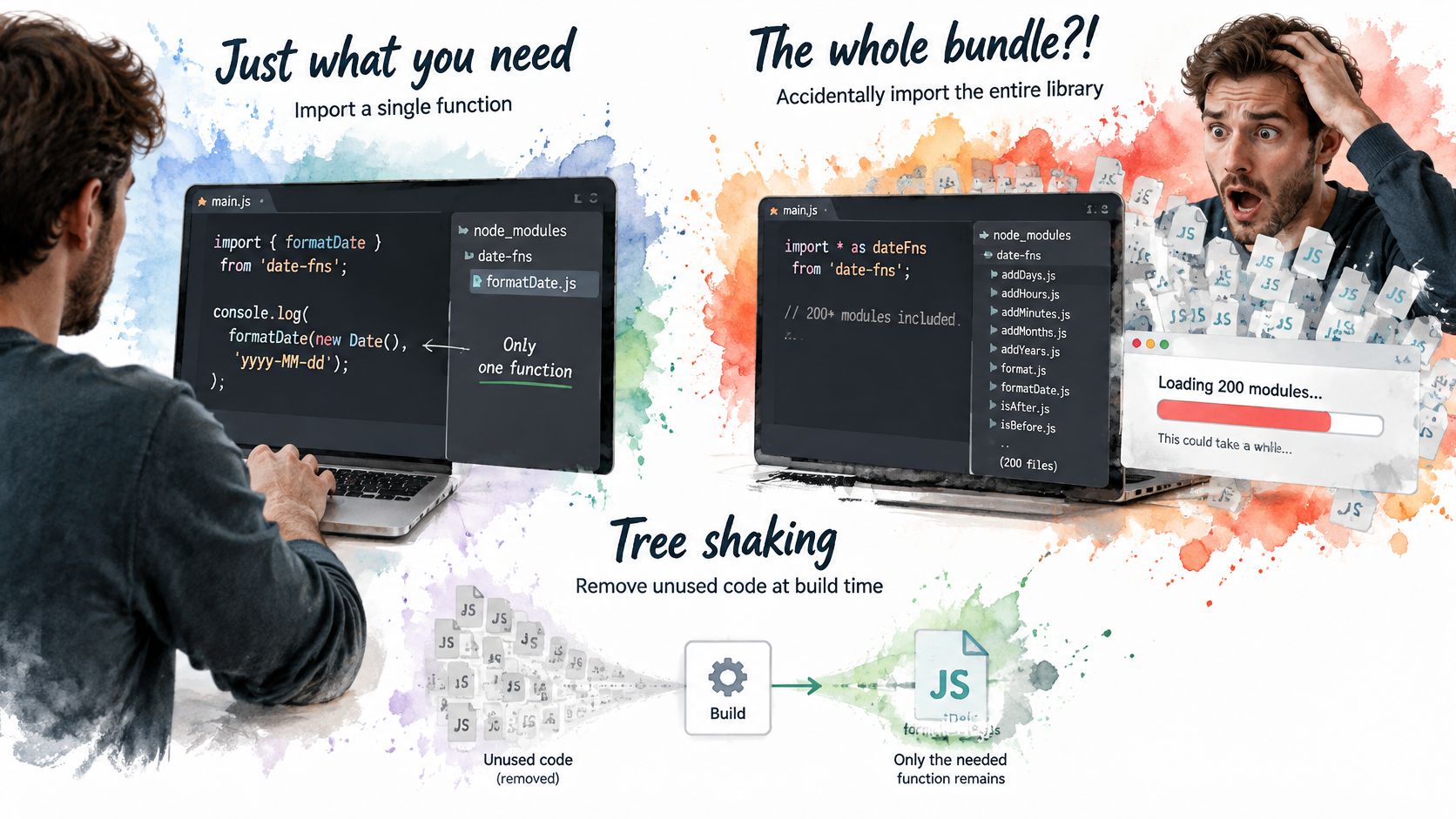
How the pruning works in plain terms
Your bundler reads which names you import, follows those names through the module graph, and drops the rest before minification. It doesn’t run your code to decide. It reads the structure, marks what’s used, and leaves unreferenced exports out of the final chunk.
That still matters because unused bytes aren’t free. The browser must download, decompress, parse, and compile JavaScript even when a function never runs. On a phone with a slower processor, that work delays rendering and the first response to a tap.
The scale is large enough to demand attention. The HTTP Archive page weight report found that in 2024, the median JavaScript payload measured across the web reached 613 KB on desktop pages and 558 KB on mobile pages, representing a 14% year-on-year increase. The same analysis found that approximately 44% of JavaScript bytes delivered to the median mobile page, about 206 KB, were unused during the page load.
Nearly half of the mobile JavaScript in that median page gave the user nothing during load.
Start with evidence from your own build. Open your production bundle in an analyser such as webpack-bundle-analyzer or Rollup’s visualiser. List the largest modules, then check which of their exports your application never imports. That list is your first pruning job.
Blockers, Symptoms and Fixes That Stop Dead Code Removal
Most failed tree shaking comes from a handful of repeatable patterns, not from a mysterious bundler bug.
| Pattern | Eliminated? | Fix |
|---|---|---|
| Named import from an ES module library | Yes | Keep imports named, for example import { debounce } from ‘library’ |
| Namespace import, for example import * as utils | Often no | Import only the named functions the application uses |
| Barrel index file that re-exports everything | Often no | Import from the deep module path or split the barrel into smaller files |
| CommonJS require() of a package | No | Switch to the ES module build or import the package’s ESM entry point |
| Package with no sideEffects field and top-level side effects | No | Declare sideEffects accurately in package.json or move the side effect into an explicit import |
| Dynamic property access, for example utils[name] | No | Replace it with a static lookup map of the allowed keys |
Why these patterns block proof
A bundler removes code only when it can prove removal won’t change behaviour. A named import gives it a clear promise: you use debounce, you don’t use the other exports. A namespace import weakens that promise because your code might read any property from utils later, including one chosen at runtime.
Barrel files create a subtler problem. An index.js that re-exports every component turns one tidy import into a traversal of the whole folder. If one re-exported module registers a custom element, injects styles, or writes to a global at the top level, the bundler may keep its neighbours too, because dropping them could be observable.
CommonJS blocks the analysis more completely. With require() and module.exports, the shape of the exports can change while the programme runs. The bundler can’t rely on a fixed list of names, so it keeps the package intact to stay safe.
Missing or inaccurate sideEffects information has a similar effect. If a package doesn’t declare that its files are pure, the bundler assumes importing a file might do something important. It keeps the file even when none of its exports are used.
Dynamic access such as utils[name] is the clearest blocker of all. The value of name isn’t known at build time, so any export could be the one you need. A static lookup map that lists the allowed functions restores proof, because the bundler can see the closed set.
Finding them in a real codebase
Search for these signals before you change configuration:
import *in application code: Replace each namespace import with the named functions that file calls.require()in client code: Check whether the package publishes an ESM entry point you can import instead.- Large barrel files on the critical route: Open the
indexfiles your entry point reaches and count what they re-export. - Computed property access: Search for bracket access on imported objects and replace open-ended lookups with explicit maps.
Don’t declare victory after editing the import. A fix is confirmed only when your bundle analyser shows the unused export gone from the production output. If the module is still there at the same size, the bundler still lacks proof, whatever your source code now looks like.
How Bundlers Decide What Is Dead Code
Tree shaking depends on static analysis. ES module imports and exports sit at the top level of a file and can’t hide inside a condition or a function call. That fixed structure lets a bundler work out which exports are referenced without running your code.
The visual below summarises that dependency on a graph known in advance.
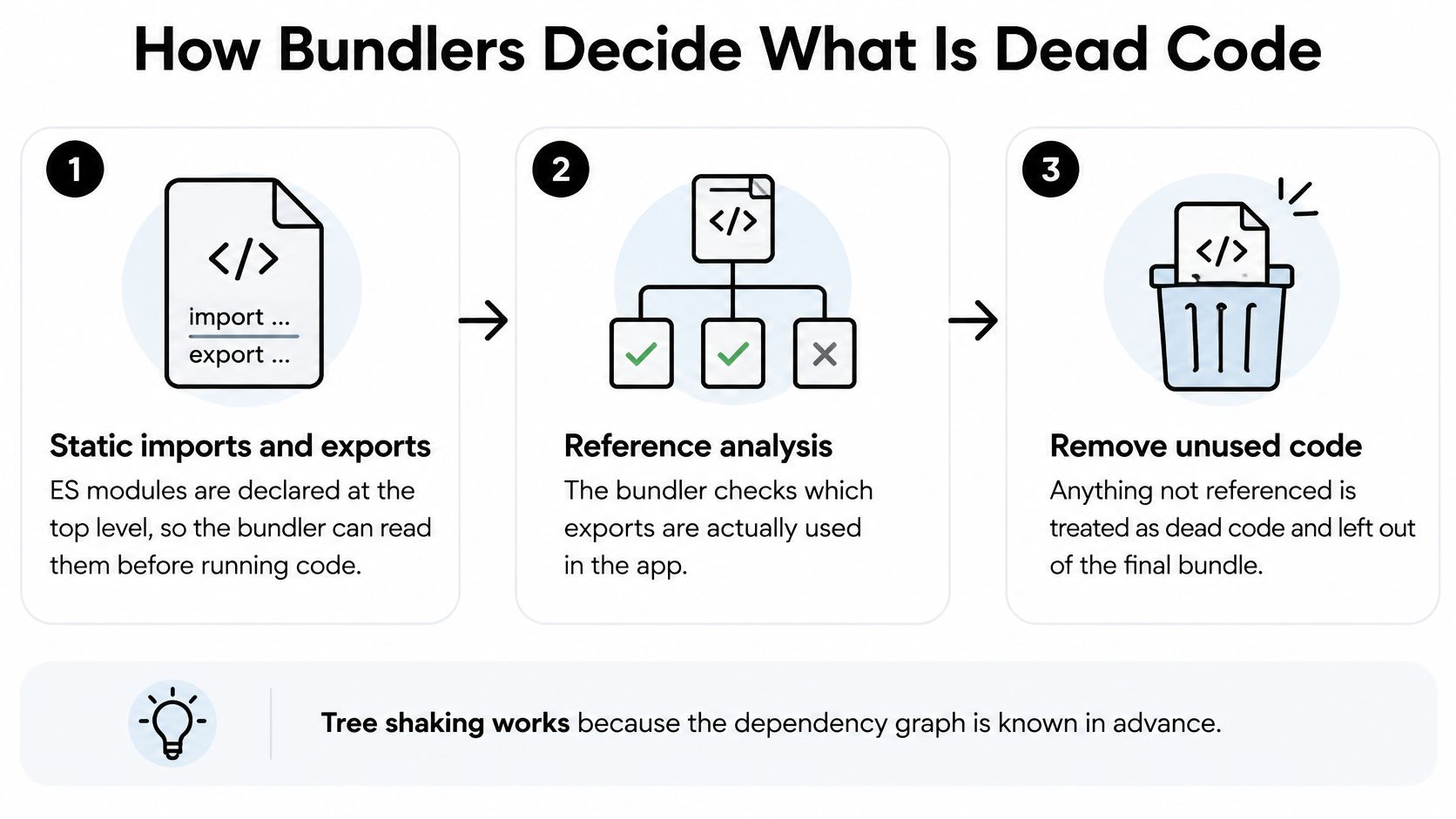
The sequence from entry point to smaller chunk
- Build the graph: The bundler reads every module reachable from your entry points and records its imports and exports.
- Mark what’s reached: It follows each imported name and marks the exports your application references.
- Treat the rest as candidates: Unmarked exports become candidates for removal, provided dropping them has no observable effect.
- Strip the unreferenced code: A minifier such as Terser, or esbuild’s own minifier, removes the dead branches during optimisation.
- Write the output: The bundler emits a smaller chunk containing only the marked code and its dependencies.
The sideEffects field in package.json strengthens step three. When a package sets "sideEffects": false, it’s promising that its files do nothing important on import. The bundler can then drop a whole file when none of its exports are used, instead of keeping it just in case. If only a few files do have effects, such as a global CSS import, the package should list those files rather than claiming purity for everything.
Practical rule: If the bundler cannot prove an export is unused and safe to drop, it will keep the code. Keeping code is the safe default.
Tools apply the same idea with different edges. Webpack removes unused exports in production mode when optimisation is enabled. Rollup was built around this model of following ES module references. Vite uses Rollup for its production build, even though its development server works differently. Esbuild runs its own bundling and minification pipeline rather than Rollup.
That difference matters when you compare results. The short walkthrough below shows the elimination process in action before you test it in your own project.
Try a controlled test. Run a production build, note the chunk size, add an unused import from a pure ES module, and build again. If shaking works, the size barely moves. Repeat with a namespace import and compare. You’ll learn more from that ten-minute experiment than from any configuration flag read in isolation.
Writing Libraries That Tree Shake Well
If you publish a package, your consumers can’t shake what you didn’t structure for shaking. Their bundler can only work with the format, entry points, and side-effect promises you ship.
Start with format and entry points
Publish ESM alongside any CommonJS build. Set the module and exports fields in package.json so bundlers resolve the ES module entry by default, not the CommonJS one. If your exports map points bundlers at a single bundled file, they’ll see one large module instead of many small ones they can prune.
Next, set sideEffects accurately. Use false only for modules that are pure. If a file imports global CSS, registers an element, or installs a polyfill, list that file explicitly. A false promise here is worse than no promise, because the bundler may drop behaviour your users need.
Granularity is the third decision. Publish one entry point per component so a consumer can import a single dialog without pulling in a command palette, a date picker, and a chart. Avoid a barrel index that re-exports every component as the only way in. A thin barrel over real per-module files can work, but deep imports must remain possible.
The consumer side has clear public guidance in the UK. The UK Government Digital Service guidance on optimising frontend performance explicitly recommends using a bundler that supports tree shaking and importing only the functionality required from a package. It also recommends code splitting when a feature is used only sporadically, because shaking removes unused code within a chunk while splitting keeps an infrequent feature out of the initial route altogether.
We design DOM Studio components as individually importable ESM modules for exactly this reason, so a team using a dialog doesn’t pay for a command palette. If you’re wiring those primitives into a framework, our guide to using web components in Vue shows the import pattern that keeps each component separate. Only publish a per-module size figure once you’ve verified it against a real published build, not a local development output.
Keep the top level quiet
Avoid top-level registrations and global writes in component modules. Move setup into an explicit init function the consumer calls. Side-effectful initialisation forces the bundler to keep a module and everything it touches, even when the exported component is never rendered.
Before you release, run this checklist:
- Inspect the published output: Look for CommonJS entry points and barrel files that would defeat a consumer’s bundler.
- Test as a consumer: Build a small application that imports one component and check its production bundle.
- Confirm a single import: Record the size of that one-component bundle and recheck it on every release.
Checking Elimination in a Production Build
A smaller gzip number doesn’t prove a faster page. You need to measure two costs separately: bytes on the wire and work on the device. Compression shrinks transfer, but the browser still parses and compiles every byte after decompression.
| Metric | How to measure | What it shows |
|---|---|---|
| Compressed transfer size | Gzip or Brotli size per route in the production build | How much the network carries |
| Parse and compile time | Performance panel on a throttled mid-range Android profile | Cost paid before any code runs |
| Main-thread execution | Lighthouse or a DevTools trace on the critical route | Delay before the page responds to input |
| Unused JavaScript | Coverage tab on the critical route | Code that downloads but never runs |
A workflow you can repeat
- Run a production build: Development builds don’t shake reliably, so never judge elimination there.
- Open a bundle analyser: Confirm which modules remain and whether the export you removed has gone.
- Check coverage: Load the critical route with the DevTools Coverage tab open and note code that downloads but never executes.
- Trace on a throttled phone profile: Repeat the load on a mid-range Android profile, not your development laptop.
The device gap explains that last step. The HTTP Archive Web Almanac JavaScript chapter found median JavaScript processing time of 1,897 ms on mobile versus 891 ms on desktop, and reported a negative correlation of -0.47 between JavaScript bytes and Lighthouse performance score. More bytes tend to mean lower scores, and the penalty lands hardest on the slower device.
Read analyser output carefully. A tool may show a module as present when only part of it survived shaking, so check export-level detail where your tool allows it before you chase a problem that doesn’t exist. Teams working on commerce front ends will find the same two-cost logic in this practical guide to reduce JavaScript overhead in Shopify stores, which separates download weight from execution work.
Record one baseline per route before you change anything. Without that starting point, you can’t tell whether a fix helped, did nothing, or shifted cost from transfer to execution.
Where Tree Shaking Stops Helping
A homepage can ship a library that marks every export as side-effect free, and the first paint can still stall. Shaking only drops modules the critical route never reaches. If that route imports the editor, the chart, and the whole design system, the bundler has nothing dead to prove, and the phone still parses all of it.
The gap shows up in real shops. The Koozai UK Ecommerce Speed Index reported that an analysis of roughly 150 UK retailers found average page payloads of 1.8 to 2.1 MB of JavaScript, and some fashion sites delivered 3 to 5 MB on their homepages. Export pruning cannot close a gap that large by itself. The bundler, the library author, and the application team each own a different slice of that weight.
Four costs shaking cannot remove
Code that’s used, but loaded too early. A homepage that imports a rich text editor for a form most visitors never open has used every export. Shaking keeps the editor the way a mover keeps a box labelled “keep,” even if nobody opens it until next month. Route-level code splitting takes that box off the first truck. The guide to code splitting shows where to draw those boundaries.
Third-party scripts. Analytics, consent tooling, chat widgets, and tag managers sit outside the module graph. The bundler never sees their exports, so it cannot prune them. Audit each tag, drop duplicates, and load non-essential tools after the page is interactive.
Hydration cost. In a server-rendered app, the browser downloads component code and runs it again to attach behaviour to HTML that is already on screen. That code is live, so shaking keeps it. The visitor still waits through parse and execute before the page answers a tap. Shrink the interactive surface on the critical route. Do not expect elimination to skip work the route performs.
Duplicated runtime code. Two versions of the same helper can both be referenced, one by your app and one by a dependency that pinned an older copy. Shaking keeps both, because both are used. Deduplicate so one shared copy serves every consumer.
Dead-code elimination removes what is never used. Code splitting keeps what is used later out of the first load. Confusing the two leads teams to blame libraries for routing decisions.
Work the critical route first, then third-party tags, then duplication. Call the library the problem only after those three are clean. A perfectly shakeable package still produces a slow page when the first route asks for too much of it.
Set a JavaScript Budget Before Your Next Release
A single size limit isn’t enough, because it treats download and execution as the same cost. Set a two-stage budget instead: one limit for initial compressed JavaScript on each route, and a second limit for post-load execution and hydration on a throttled mobile device.
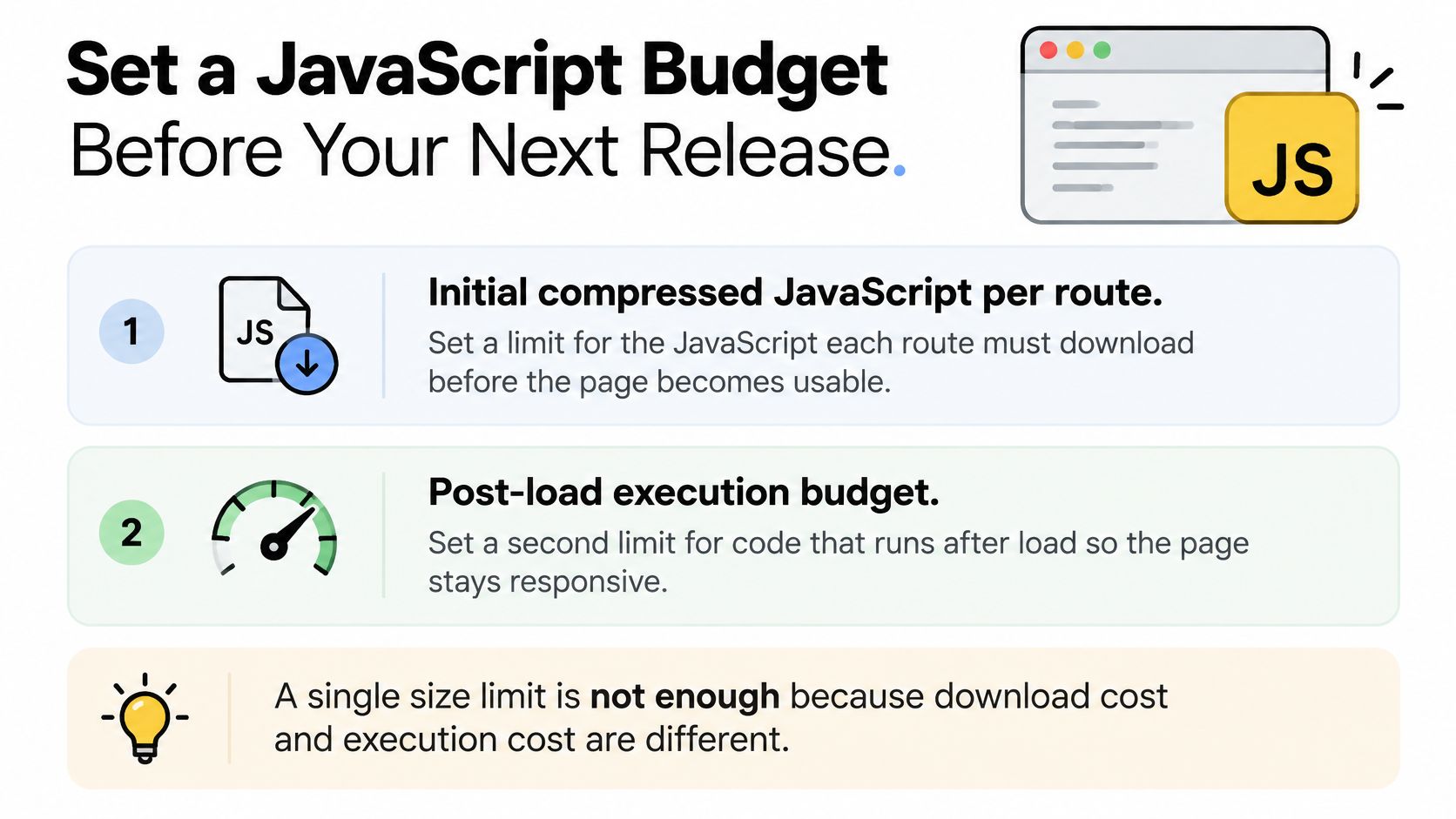
Reference points help you choose realistic limits. The Catch Metrics analysis of approximately 300,000 Next.js domains reported median bundles of about 350 KB in the lightest decile, more than 1 MB around the middle, and over 3 MB in the ninth decile. For the heaviest sites, download-and-parse delays could exceed 3 seconds. Where your routes sit in that spread tells you whether your budget is ambitious or merely decorative.
Turn the budget into a release gate
- Set a budget for each critical route: Start with the heaviest route your users must load.
- Run the production build in CI: Compare route-level compressed size against the budget automatically.
- Fail the build on excess: A warning nobody reads won’t stop the next large dependency.
- Trace the heaviest route: Run the throttled mobile trace and record execution and hydration time.
- Save the result as the baseline: The next change is judged against measured reality, not memory.
Our broader notes on performance optimisation place that gate alongside image, font, and rendering budgets. If you run a storefront, this guide to optimize Shopify storefront performance applies the same budget thinking to templates and apps.
Check accessibility after every removal. Confirm you haven’t dropped side-effectful registration, styles, or ARIA behaviour, and retest keyboard and screen reader flows on the changed route. A smaller bundle that breaks focus management isn’t an improvement.
Make the decision now: pick your heaviest critical route, set its two limits, and wire the check into CI before the next release. Every other route can follow once that gate exists.
DOM Studio gives you accessible, headless web component primitives with a polished Vue layer, published as small, individually importable modules so tree shaking can keep unused components out of your bundle. Browse the component catalogue, import only what each route needs, and put your new budget to work by visiting DOM Studio today.