
A product team ships a catalogue with numbered pages, then watches mobile users abandon it after the first screen. Meanwhile, a developer discovers that deep OFFSET queries are taking longer as the database table grows. Both problems come from the same decision being treated as a visual detail.
Pagination is a product choice with consequences for user control, server cost, and accessibility. Numbered pages help people return to a known location, while infinite scroll supports continuous discovery. Offset-based APIs are simple to build, but cursor-based APIs behave more predictably as data changes. Even a polished control fails if keyboard and screen-reader users can’t identify the current page or understand what changed.
The following examples of pagination cover eight practical patterns, from numbered links and ellipses to load more controls, cursor APIs, and hypermedia navigation. Each one includes a real use case, the trade-offs that matter in production, and a Vue or API implementation note you can act on.
Table of Contents
- 1. Numbered Page Pagination
- 2. Compact Pagination with Ellipses
- 3. Previous and Next Pagination
- 4. Load More Button
- 5. Infinite Scroll
- 6. Offset-Based Limit and Offset Pagination
- 7. Cursor-Based Keyset Pagination
- 8. Link Header and Hypermedia-Driven Pagination
- 8 Pagination Methods Compared
- Choosing the Right Pagination Pattern for Your Product
1. Numbered Page Pagination
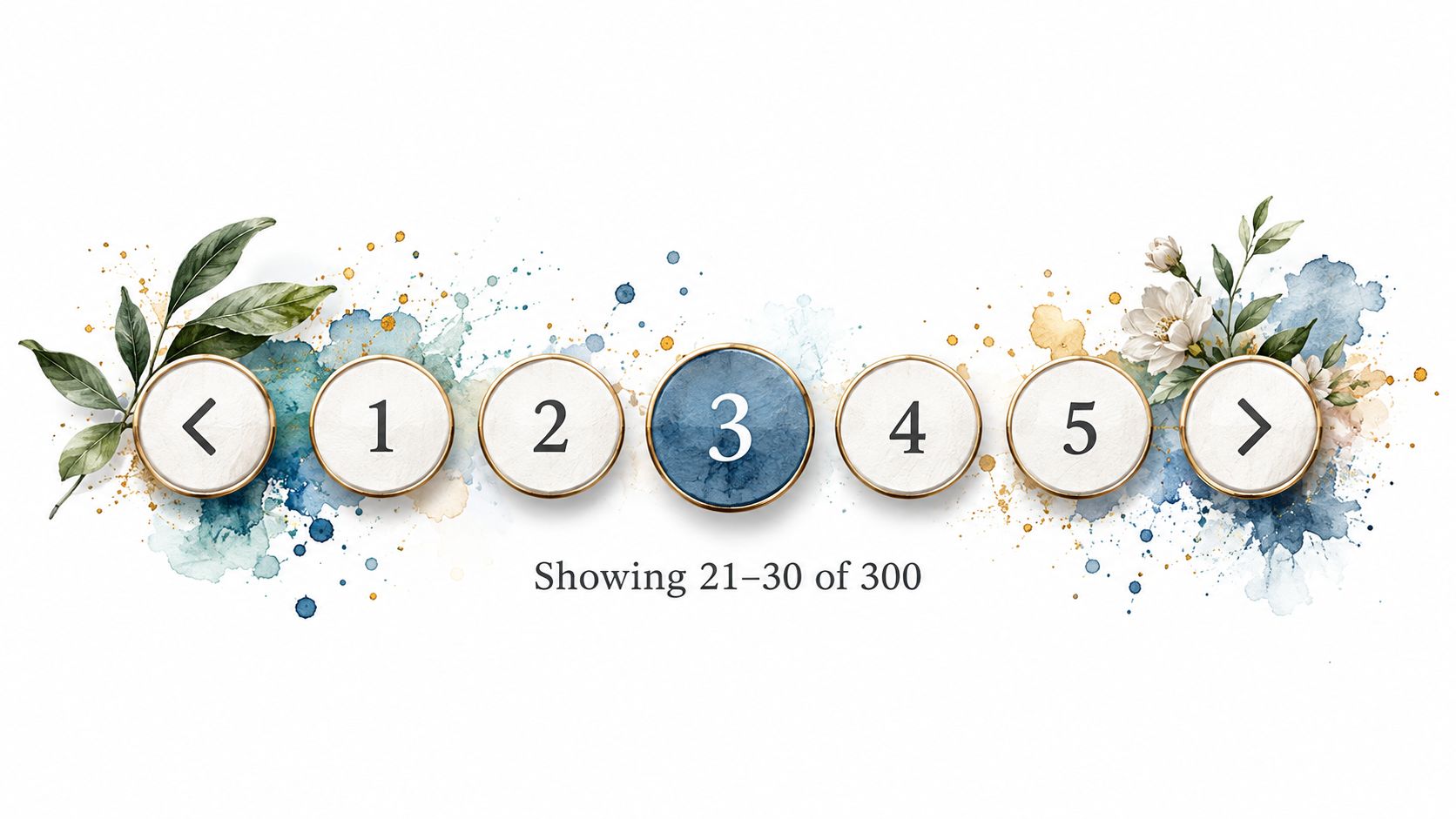
Numbered pagination is the dependable default for search results, catalogues, and administrative lists. A control might show Previous, 1, 2, 3, 4, and Next, allowing users to jump directly to a known location instead of stepping through every result. Google Search result pages and many retail category pages use this model because the visible sequence gives users a sense of scope and position.
The pattern works best when page location matters. A user comparing products can open page 3 in a new tab, return to it through browser history, or share a URL containing ?page=3. That control comes with a cost: the server and interface need a stable page model, and changing inventory or search results can shift items between pages.
Build the state into the interface
Use a semantic <nav> landmark with a descriptive accessible name. Mark the active link with aria-current="page", and keep Previous and Next in the layout on boundary pages by disabling them rather than hiding them. Stable placement reduces visual movement and makes keyboard navigation easier to predict.
Practical rule: A page number must communicate both its action and its state. “Page 3” is clearer than an unlabeled button containing only
3.
In Vue, expose the current page through v-model, then let the parent own fetching, filters, and URL synchronisation. Keep page, pageSize, search terms, and sort order together so changing a filter resets the page deliberately rather than showing an empty deep page.
For a production checklist covering the interaction itself, see these pagination control implementation details. Action: use numbered pagination when users need direct access to a bounded location, then test browser back navigation, deep links, keyboard focus, and filter changes before shipping.
2. Compact Pagination with Ellipses
A long run of page numbers makes a dashboard look crowded and gives mobile users too many targets to scan. Compact pagination solves that by retaining the first page, last page, current page, and nearby pages while replacing distant ranges with ellipses. A control might read 1, 2, 3, …, 18, 19, 20 when the current location is near the beginning.
This variation preserves page jumping without expanding as the dataset grows. Material UI exposes similar behaviour through boundaryCount and siblingCount, while enterprise tables and log viewers often tune those values at different breakpoints.
The ellipsis is not automatically an action. If it only indicates omitted pages, it should not receive focus and should be hidden from assistive technology. If it opens a jump menu, it becomes an interactive control and needs a clear accessible name and an explicit keyboard behaviour.
Keep the range calculation predictable
Implement the visible range as a pure function that accepts totalPages, currentPage, and siblingCount. That keeps the rules independent from rendering and makes edge cases easy to test, including the first page, last page, and transitions where an ellipsis appears or disappears.
A numeric page input can help users reach distant pages, particularly in a large data table. Don’t force people to activate Next repeatedly when the interface already knows the total page count.
The control should also adapt without changing its meaning:
- Expose density: Make
siblingCounta component prop so a design system can use a tighter range on small screens. - Preserve names: Render labels such as “Go to page 6”, not just the visible numeral.
- Test transitions: Check that focus remains on the activated page and that the current state updates programmatically.
DOM Studio’s pagination component documentation is useful when standardising these props in a Vue interface. Action: write and unit-test the range function before styling the component, then verify that ellipses are either inert indicators or fully accessible jump controls.
3. Previous and Next Pagination
Some content has a natural sequence, but page numbers add little value. Article archives, forum topics, and chronological records often work better with Older articles and Newer articles controls. Users are moving through a stream, not trying to locate page 27.
The important distinction is wording. “Next” can be ambiguous when the page is sorted newest first. “Older articles” tells the user exactly where the link leads, and it remains understandable when read out of visual context by a screen reader.
A bounded dataset may still benefit from a position indicator such as Showing 21–40, but don’t invent a total when the API doesn’t know one. If the collection changes frequently, a simple sequential control can avoid presenting page counts that become inaccurate between requests.
Keep the sequence honest
For ordinary document links, rel="prev" and rel="next" can describe the relationship between adjacent resources. They don’t replace visible labels or correct focus behaviour, but they add useful relationship metadata.
This pattern has a lower interface cost than numbered pagination, yet its server cost depends on how the next slice is selected. A small, stable archive can use page parameters. A constantly changing feed should usually use a cursor so newly inserted records don’t cause users to see duplicates or miss items.
In Tailwind, make keyboard focus obvious with a focus-visible ring and maintain a logical tab order. Don’t rely on colour alone to distinguish disabled and active states.
Action: choose Previous and Next when users consume content sequentially, label the direction with words that match the sort order, and add a visible position indicator when users need to know where they are.
4. Load More Button
A Load more button adds another result batch below the existing list instead of replacing the current page. It suits product grids, comment threads, and content-heavy search interfaces where people want to retain what they’ve already inspected but still control whether more data arrives.
Compared with infinite scroll, this pattern gives users an explicit stopping point. The footer remains reachable, and the browser isn’t forced to fetch content because someone has scrolled near the bottom. The trade-off is that the document grows, so memory use and rendering work can increase as the session continues.
Make the update perceivable
The button needs a clear pending state. Disable it while a request is active, expose aria-busy on the result container, and announce the update through a polite live region. A message such as “More results loaded” gives screen-reader users the same confirmation that sighted users get from seeing new cards appear.
Focus needs a deliberate policy. Leaving focus on the button makes repeated loading straightforward. Moving focus to the first new result can help users understand where the update begins, but it may interrupt people who want to activate the button again.
A Vue composable such as useLoadMore can own the reactive array, request state, cursor, and hasMore flag. Keep the result items separate from transport metadata, and cancel or ignore stale responses when users change filters during a request.
Loading another batch should never make the user lose the point at which they activated the control.
Use a stable item key and render a useful empty state when the API returns no additional results. Action: ship Load more when users browse in batches, then test repeated activation, request failure, keyboard focus, live announcements, and the end-of-results state.

5. Infinite Scroll
Infinite scroll removes the visible page control and loads another batch when the user approaches the end of the list. It fits discovery-led interfaces such as image galleries, social timelines, and visual inspiration boards, where users don’t usually know which item they want before browsing.
Its strength is continuity. Its weakness is control. Users can lose their position, struggle to reach the footer, and find that returning from a detail page restores an incomplete or different list. Keyboard users also need a usable alternative when an observer doesn’t trigger in the same way as a pointer-driven scroll.
Use automation with an escape route
An IntersectionObserver watching a sentinel element is preferable to scroll-event calculations. Load before the user reaches the boundary, but keep a visible Load more fallback so the experience doesn’t depend on JavaScript observation working perfectly.
Virtualisation becomes important for long sessions. Keep only the necessary items mounted when the list becomes large, while preserving stable keys and meaningful focus targets. When a user opens an item and returns, store the loaded cursor or an equivalent restoration state so the interface can reconstruct the previous position.
The loading state also needs an announcement. An aria-live region can report that more results are loading or available, but don’t announce every minor visual transition so frequently that assistive technology becomes noisy.
For Vue teams, this Vue pagination guidance provides a useful starting point for separating navigation state from result rendering.
This pattern has a real accessibility risk. UK accessibility guidance identifies pagination as an area requiring semantic landmarks, an exposed current state, visible focus, and predictable movement, while a UK university audit recorded 54 WCAG 2.2 issues, including problems with pagination focus indicators and carousel pagination semantics. The audit PDF shows why visual testing alone isn’t enough.
Action: use infinite scroll only for continuous discovery, provide a keyboard-accessible fallback, restore position from detail views, and test with keyboard-only navigation, NVDA, and VoiceOver.
6. Offset-Based Limit and Offset Pagination
Offset pagination expresses a request as a starting position and a batch size, commonly limit and offset, or page and per_page. It maps neatly to SQL and is straightforward for REST endpoints, admin panels, and content-management lists.
The frontend model is familiar: request page 2 with a chosen page size, receive rows and metadata, then render controls from total, page, and pageSize. The server must still validate the requested size and enforce a maximum. A client should never be trusted to decide how many records an endpoint will return.
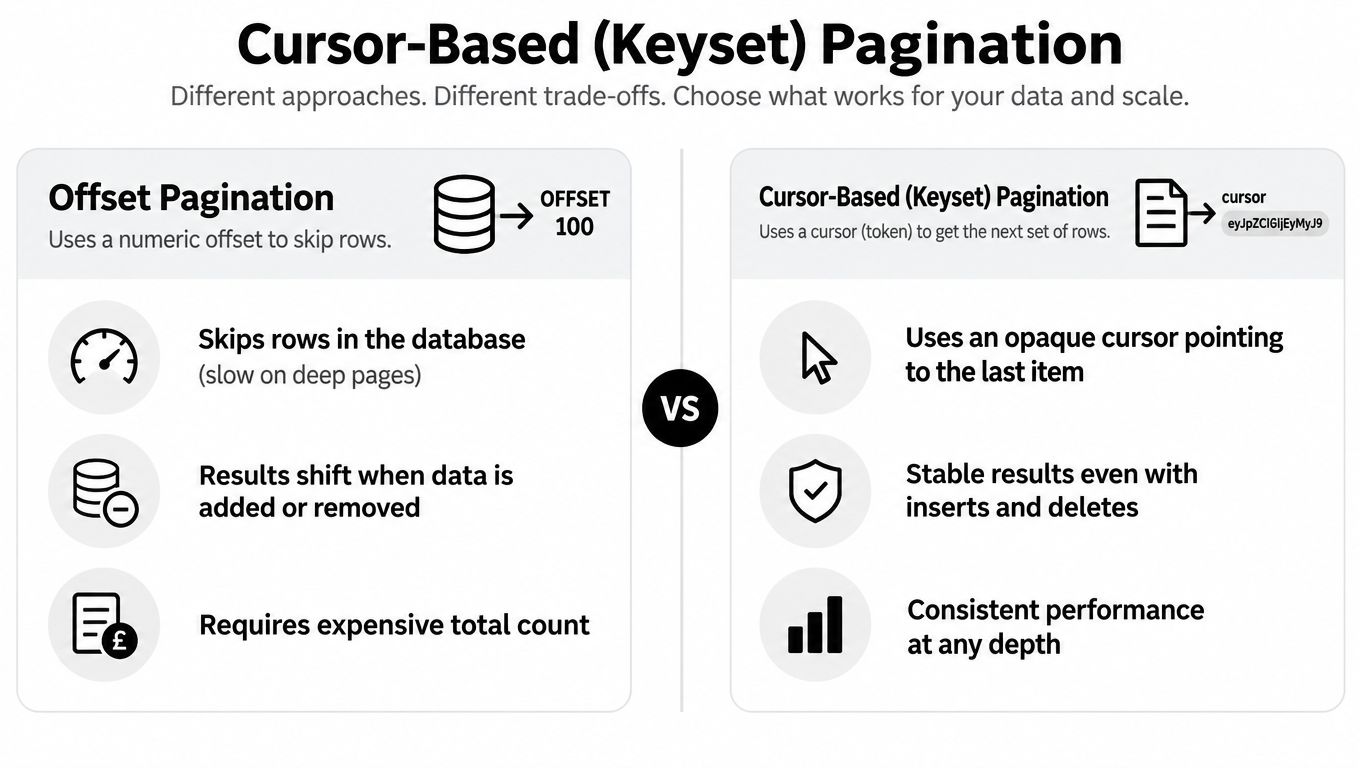
Offset has an important cost at depth. The database may need to move past earlier rows before returning the requested slice, and concurrent inserts or deletes can shift records between requests. That makes it convenient for arbitrary page jumps but less reliable for high-volume feeds that change constantly.
Keep API and UI contracts explicit
A Vue implementation can keep page and pageSize in one reactive object and derive the query string from that object. Watch filters and sorting separately, reset the page when those inputs change, and cancel stale requests so an older response can’t overwrite a newer result.
Return a deterministic sort order. Without one, the same row may appear on adjacent pages or disappear between requests even when the offset is unchanged. Return an explicit empty result when a page becomes invalid rather than showing unrelated data.
Protect the endpoint as carefully as any other public surface. These API endpoint security practices are relevant when pagination parameters are exposed to untrusted clients.
Offset pagination is a good product fit when users need page numbers. It isn’t a guarantee of consistent deep-page performance.
Action: use offset pagination for small or moderate, relatively stable collections, cap per_page server-side, return clear metadata, and move to a cursor when the list becomes large or changes frequently.
7. Cursor-Based Keyset Pagination
Cursor pagination replaces a numeric offset with an opaque token representing the last item received. The next request says, in effect, “continue after this position”, rather than “skip all earlier rows”. Stripe uses starting_after and ending_before, X API uses pagination tokens, Slack exposes a next_cursor, and GraphQL Relay models the same idea through edges and page information.
The pattern is strong for high-volume feeds because inserts and deletes are less likely to shift the user backwards or forwards unexpectedly. It also pairs naturally with Load more and infinite scroll. The trade-off is reduced random access. A cursor usually tells the server how to continue, not how to jump directly to an arbitrary page.
Treat the cursor as an API boundary
The server must define a deterministic order. If timestamps can tie, add a unique tiebreaker such as an ID to the sort key. The client should treat the returned cursor as opaque, store it in a Vue ref or reactive object, and send it back without parsing or constructing it.
A response commonly includes items, a next cursor, and a hasMore state. The client should request another batch only when that state permits it. Invalid or expired cursors need a deliberate error response and recovery path, such as restarting from the first batch while explaining what happened.
Don’t expose database implementation details in a cursor. An opaque token lets the server change its encoding, index strategy, or filtering rules without requiring frontend changes. This API design guide from Zemith provides further context for keeping resource navigation contracts deliberate.
Action: choose cursor pagination for feeds and APIs with large, changing datasets, enforce a stable composite sort, and combine the cursor with a Load more or infinite-scroll interface rather than pretending it supports arbitrary page jumps.
8. Link Header and Hypermedia-Driven Pagination
Hypermedia pagination lets the server provide navigation links instead of requiring the client to build every URL. Those links can appear in an HTTP Link header or inside the response body, with relations such as next, prev, first, and last. GitHub’s REST API, JSON:API implementations, and other public APIs use this style to keep URL construction on the server side.
The main benefit is decoupling. A Vue client follows the URL supplied by the API, so a server can change query parameters, path structures, signing rules, or cursor formats without forcing a frontend release. This is especially useful when several clients consume the same API and shouldn’t each duplicate navigation logic.
Follow relations, don’t guess URLs
Parse the header with a small, well-tested utility and handle missing relations gracefully. A response may provide next without last, or omit prev on the first request. The UI should derive its available controls from those links rather than assuming that every response has the same shape.
Cross-origin browser clients also need the server to expose the Link header through CORS. If that configuration is missing, the API may return useful navigation metadata that the browser won’t allow JavaScript to read.
A Vue composable can wrap the transport contract and expose next(), prev(), hasNext, and hasPrevious as reactive values. Keep the composable responsible for following links, while the pagination component remains responsible for labels, focus, disabled states, and announcements.
The client should consume the navigation contract, not reverse-engineer it.
This pattern works with numbered controls when the server supplies first and last links, but it often pairs more naturally with Previous and Next or Load more. Action: centralise link parsing in one tested utility, expose the relevant response headers, and make every client follow relation links instead of concatenating URLs.
8 Pagination Methods Compared
| Pattern | Implementation Complexity 🔄 | Resource & Performance ⚡ | Expected Outcomes 📊⭐ | Ideal Use Cases 💡 | Key Advantages ⭐ |
|---|---|---|---|---|---|
| Numbered Page Pagination | Medium 🔄🔄, straightforward UI + total-count logic | Moderate ⚡⚡, needs total counts; good for server-rendered sites | Clear scope & location; predictable navigation 📊⭐⭐ | Search results, e‑commerce catalogues, paginated lists 💡 | Familiar, bookmarkable, easy to test ⭐⭐ |
| Compact Pagination with Ellipses | Medium‑High 🔄🔄🔄, extra logic to compute visible range | Moderate ⚡⚡, keeps layout stable; still often needs total count | Stable, fixed-width control; preserves orientation 📊⭐ | Dashboards, enterprise data tables, long document viewers 💡 | Scales visually to many pages; space‑efficient ⭐ |
| Previous and Next Pagination | Low 🔄, only two actions and simple state | High efficiency ⚡⚡⚡, no total count required | Simple sequential flow; limited findability 📊 | Blogs, chronological feeds, forums 💡 | Very simple, mobile‑friendly, low server cost ⭐ |
| Load More Button | Low‑Medium 🔄🔄, incremental loading + state handling | Moderate ⚡⚡, preserves scroll; DOM can grow without virtualization | User‑controlled loading; preserves context and footer access 📊⭐ | Product grids, comment threads, search results 💡 | Balances control and continuity; more accessible than infinite scroll ⭐ |
| Infinite Scroll | Medium‑High 🔄🔄🔄, needs observers, state restore, virtualization | Variable ⚡⚡, high engagement but can cause memory/performance issues if not virtualized | Seamless discovery and high engagement; poor deep‑findability 📊⭐ | Social feeds, image galleries, discovery surfaces 💡 | Smooth browsing on touch devices; maximises engagement ⭐ |
| Offset-Based (Limit/Offset) Pagination | Low 🔄, maps directly to SQL LIMIT/OFFSET | Low efficiency at depth ⚡, scans/offsets get costly; total counts expensive | Supports arbitrary jumps and numbered UIs; can show totals 📊 | REST APIs, admin panels for small–moderate datasets 💡 | Simple to implement; compatible with numbered pagination ⭐ |
| Cursor-Based (Keyset) Pagination | High 🔄🔄🔄, opaque cursors and deterministic sort needed | High efficiency ⚡⚡⚡, consistent performance at scale; avoids expensive counts | Stable results under concurrent writes; ideal for streaming UI 📊⭐⭐ | High‑volume APIs, infinite scroll/load‑more UIs, public APIs 💡 | Scales well; avoids duplicates/gaps; performant ⭐⭐⭐ |
| Link Header & Hypermedia Pagination | Medium 🔄🔄, server emits links; client follows them | Moderate ⚡⚡, standards-based; requires header exposure (CORS) for browsers | Decouples client from URL structure; self‑describing navigation 📊 | Public APIs, JSON:API, GitHub‑style APIs 💡 | Standards-based, resilient to server changes; easy incremental adoption ⭐ |
Choosing the Right Pagination Pattern for Your Product
Start with how users move through the content. If they search, compare, return to known locations, or need to share a result page, use numbered pagination. If they read articles or browse records in sequence, Previous and Next is usually clearer. If they discover content continuously, choose Load more or infinite scroll, but keep an explicit fallback for people who use a keyboard or assistive technology.
Next, ask whether users need to jump. A dashboard operator reviewing a particular page benefits from numbered controls or compact ellipses. A social feed rarely needs a page 12 link, and exposing one can make the interaction harder without adding useful control. Compact pagination is a practical middle ground when the total is known but the full sequence would overwhelm the interface.
Then examine how often the data changes. Stable, bounded data can tolerate offset-based requests and page counts. Frequently changing data is safer with cursor or keyset pagination, particularly when users load successive batches and must not see the same record repeatedly. Hypermedia links are useful when the server needs to own URL construction and multiple clients share the API.
Finally, estimate how the dataset will grow and where the work will happen. The UK Government Digital Service recommends measuring task completion, reach, trust, cost per successful visit, response time, and broken links when evaluating information journeys, rather than treating clicks as the only success signal. A GOV.UK search case study reported approximately 200,000 fewer estimated exits per year and around 1.17 million additional annual result clicks after improvements to search-result journeys, as described by Softwire’s GOV.UK case study. The lesson for pagination is to instrument page clicks, Next and Previous actions, zero-result exits, and downstream task completion separately.
A practical default looks like this:
- Search results: Numbered pages with URL state and a clear current-page indicator.
- Dense admin tables: Compact pagination backed by offset requests while the dataset remains manageable.
- Product catalogues: Load more when retaining viewed products matters and the footer must remain reachable.
- Continuous discovery feeds: Infinite scroll only with a Load more fallback and position restoration.
- High-volume APIs: Cursor-based pagination with opaque tokens and deterministic sorting.
- Shared public APIs: Hypermedia or Link-header navigation when clients shouldn’t construct URLs.
Accessibility belongs in the implementation contract, not in a final visual pass. The NHS digital service guidance recommends pagination for related content when putting everything on one page would make it slow to load or difficult to read. Its topic guidance limits the visible sequence to 8 pages and requires the current, preceding, following, first, and last pages, while testing in three laboratories in 2018 found that 4 out of 5 users successfully moved between paginated content, including a participant with very low digital skill, according to the NHS pagination guidance. Treat those rules as a design reference, then test your own component with keyboard-only use, NVDA, VoiceOver, zoom, and high-contrast modes.
Before release, audit four things:
- URL state: Can users bookmark, share, and return to the same result or filter state?
- Focus management: Does focus remain predictable after page replacement or appended content?
- Announcements: Can assistive technology identify the current page, loading state, and updated result set?
- Server limits: Does the API cap page size, validate cursors, use deterministic sorting, and avoid unnecessary deep scans?
Teams building these controls in Vue can pair them with DOM Studio’s accessible, headless primitives, keeping interaction logic consistent across data grids, search results, logs, and resource lists.
DOM Studio provides Vue-ready pagination primitives for numbered pages, compact controls, page size, total items, and page-change events, alongside data-grid support for page-number and cursor-fed navigation. Visit DOM Studio to explore headless components that handle ARIA patterns and keyboard behaviour while you connect them to your own API and pagination strategy.